discover · compare · collections · requirements · contribute · feed · watching · stats · help with your tokens
winfunc/opcode · source
Snapshot 0 · 2026-11-04T12:47:27Z · TypeScript · AGPL-3.0
Content fingerprint
a11bfd68cc2a61ad21b81f9c060f3f031681cce8d50fead340b988dc8a705c02GitHub description at capture
A powerful GUI app and Toolkit for Claude Code - Create custom agents, manage interactive Claude Code sessions, run secure background agents, and more.
README at capture
<div align="center">
<img src="src-tauri/icons/icon.png" alt="opcode Logo" width="120" height="120">
<h1>opcode</h1>
<p>
<strong>A powerful GUI app and Toolkit for Claude Code</strong>
</p>
<p>
<strong>Create custom agents, manage interactive Claude Code sessions, run secure background agents, and more.</strong>
</p>
<p>
<a href="#features"><img src="https://img.shields.io/badge/Features-✨-blue?style=for-the-badge" alt="Features"></a>
<a href="#installation"><img src="https://img.shields.io/badge/Install-🚀-green?style=for-the-badge" alt="Installation"></a>
<a href="#usage"><img src="https://img.shields.io/badge/Usage-📖-purple?style=for-the-badge" alt="Usage"></a>
<a href="#development"><img src="https://img.shields.io/badge/Develop-🛠️-orange?style=for-the-badge" alt="Development"></a>
<a href="https://discord.com/invite/KYwhHVzUsY"><img src="https://img.shields.io/badge/Discord-Join-5865F2?style=for-the-badge&logo=discord&logoColor=white" alt="Discord"></a>
</p>
</div>
https://github.com/user-attachments/assets/6bceea0f-60b6-4c3e-a745-b891de00b8d0
> [!TIP]
> **⭐ Star the repo and follow [@getAsterisk](https://x.com/getAsterisk) on X for early access to `asteria-swe-v0`**.
> [!NOTE]
> This project is not affiliated with, endorsed by, or sponsored by Anthropic. Claude is a trademark of Anthropic, PBC. This is an independent developer project using Claude.
## 🌟 Overview
**opcode** is a powerful desktop application that transforms how you interact with Claude Code. Built with Tauri 2, it provides a beautiful GUI for managing your Claude Code sessions, creating custom agents, tracking usage, and much more.
Think of opcode as your command center for Claude Code - bridging the gap between the command-line tool and a visual experience that makes AI-assisted development more intuitive and productive.
## 📋 Table of Contents
- [🌟 Overview](#-overview)
- [✨ Features](#-features)
- [🗂️ Project & Session Management](#️-project--session-management)
- [🤖 CC Agents](#-cc-agents)
- [📊 Usage Analytics Dashboard](#-usage-analytics-dashboard)
- [🔌 MCP Server Management](#-mcp-server-management)
- [⏰ Timeline & Checkpoints](#-timeline--checkpoints)
- [📝 CLAUDE.md Management](#-claudemd-management)
- [📖 Usage](#-usage)
- [Getting Started](#getting-started)
- [Managing Projects](#managing-projects)
- [Creating Agents](#creating-agents)
- [Tracking Usage](#tracking-usage)
- [Working with MCP Servers](#working-with-mcp-servers)
- [🚀 Installation](#-installation)
- [🔨 Build from Source](#-build-from-source)
- [🛠️ Development](#️-development)
- [🔒 Security](#-security)
- [🤝 Contributing](#-contributing)
- [📄 License](#-license)
- [🙏 Acknowledgments](#-acknowledgments)
## ✨ Features
### 🗂️ **Project & Session Management**
- **Visual Project Browser**: Navigate through all your Claude Code projects in `~/.claude/projects/`
- **Session History**: View and resume past coding sessions with full context
- **Smart Search**: Find projects and sessions quickly with built-in search
- **Session Insights**: See first messages, timestamps, and session metadata at a glance
### 🤖 **CC Agents**
- **Custom AI Agents**: Create specialized agents with custom system prompts and behaviors
- **Agent Library**: Build a collection of purpose-built agents for different tasks
- **Background Execution**: Run agents in separate processes for non-blocking operations
- **Execution History**: Track all agent runs with detailed logs and performance metrics
### 📊 **Usage Analytics Dashboard**
- **Cost Tracking**: Monitor your Claude API usage and costs in real-time
- **Token Analytics**: Detailed breakdown by model, project, and time period
- **Visual Charts**: Beautiful charts showing usage trends and patterns
- **Export Data**: Export usage data for accounting and analysis
### 🔌 **MCP Server Management**
- **Server Registry**: Manage Model Context Protocol servers from a central UI
- **Easy Configuration**: Add servers via UI or import from existing configs
- **Connection Testing**: Verify server connectivity before use
- **Claude Desktop Import**: Import server configurations from Claude Desktop
### ⏰ **Timeline & Checkpoints**
- **Session Versioning**: Create checkpoints at any point in your coding session
- **Visual Timeline**: Navigate through your session history with a branching timeline
- **Instant Restore**: Jump back to any checkpoint with one click
- **Fork Sessions**: Create new branches from existing checkpoints
- **Diff Viewer**: See exactly what changed between checkpoints
### 📝 **CLAUDE.md Management**
- **Built-in Editor**: Edit CLAUDE.md files directly within the app
- **Live Preview**: See your markdown rendered in real-time
- **Project Scanner**: Find all CLAUDE.md files in your projects
- **Syntax Highlighting**: Full markdown support with syntax highlighting
## 📖 Usage
### Getting Started
1. **Launch opcode**: Open the application after installation
2. **Welcome Screen**: Choose between CC Agents or Projects
3. **First Time Setup**: opcode will automatically detect your `~/.claude` directory
### Managing Projects
```
Projects → Select Project → View Sessions → Resume or Start New
```
- Click on any project to view its sessions
- Each session shows the first message and timestamp
- Resume sessions directly or start new ones
### Creating Agents
```
CC Agents → Create Agent → Configure → Execute
```
1. **Design Your Agent**: Set name, icon, and system prompt
2. **Configure Model**: Choose between available Claude models
3. **Set Permissions**: Configure file read/write and network access
4. **Execute Tasks**: Run your agent on any project
### Tracking Usage
```
Menu → Usage Dashboard → View Analytics
```
- Monitor costs by model, project, and date
- Export data for reports
- Set up usage alerts (coming soon)
### Working with MCP Servers
```
Menu → MCP Manager → Add Server → Configure
```
- Add servers manually or via JSON
- Import from Claude Desktop configuration
- Test connections before using
## 🚀 Installation
### Prerequisites
- **Claude Code CLI**: Install from [Claude's official site](https://claude.ai/code)
### Release Executables Will Be Published Soon
## 🔨 Build from Source
### Prerequisites
Before building opcode from source, ensure you have the following installed:
#### System Requirements
- **Operating System**: Windows 10/11, macOS 11+, or Linux (Ubuntu 20.04+)
- **RAM**: Minimum 4GB (8GB recommended)
- **Storage**: At least 1GB free space
#### Required Tools
1. **Rust** (1.70.0 or later)
```bash
# Install via rustup
curl --proto '=https' --tlsv1.2 -sSf https://sh.rustup.rs | sh
```
2. **Bun** (latest version)
```bash
# Install bun
curl -fsSL https://bun.sh/install | bash
```
3. **Git**
```bash
# Usually pre-installed, but if not:
# Ubuntu/Debian: sudo apt install git
# macOS: brew install git
# Windows: Download from https://git-scm.com
```
4. **Claude Code CLI**
- Download and install from [Claude's official site](https://claude.ai/code)
- Ensure `claude` is available in your PATH
#### Platform-Specific Dependencies
**Linux (Ubuntu/Debian)**
```bash
# Install system dependencies
sudo apt update
sudo apt install -y \
libwebkit2gtk-4.1-dev \
libgtk-3-dev \
libayatana-appindicator3-dev \
librsvg2-dev \
patchelf \
build-essential \
curl \
wget \
file \
libssl-dev \
libxdo-dev \
libsoup-3.0-dev \
libjavascriptcoregtk-4.1-dev
```
**macOS**
```bash
# Install Xcode Command Line Tools
xcode-select --install
# Install additional dependencies via Homebrew (optional)
brew install pkg-config
```
**Windows**
- Install [Microsoft C++ Build Tools](https://visualstudio.microsoft.com/visual-cpp-build-tools/)
- Install [WebView2](https://developer.microsoft.com/microsoft-edge/webview2/) (usually pre-installed on Windows 11)
### Build Steps
1. **Clone the Repository**
```bash
git clone https://github.com/getAsterisk/opcode.git
cd opcode
```
2. **Install Frontend Dependencies**
```bash
bun install
```
3. **Build the Application**
**For Development (with hot reload)**
```bash
bun run tauri dev
```
**For Production Build**
```bash
# Build the application
bun run tauri build
# The built executable will be in:
# - Linux: src-tauri/target/release/
# - macOS: src-tauri/target/release/
# - Windows: src-tauri/target/release/
```
4. **Platform-Specific Build Options**
**Debug Build (faster compilation, larger binary)**
```bash
bun run tauri build --debug
```
**Universal Binary for macOS (Intel + Apple Silicon)**
```bash
bun run tauri build --target universal-apple-darwin
```
### Troubleshooting
#### Common Issues
1. **"cargo not found" error**
- Ensure Rust is installed and `~/.cargo/bin` is in your PATH
- Run `source ~/.cargo/env` or restart your terminal
2. **Linux: "webkit2gtk not found" error**
- Install the webkit2gtk development packages listed above
- On newer Ubuntu versions, you might need `libwebkit2gtk-4.0-dev`
3. **Windows: "MSVC not found" error**
- Install Visual Studio Build Tools with C++ support
- Restart your terminal after installation
4. **"claude command not found" error**
- Ensure Claude Code CLI is installed and in your PATH
- Test with `claude --version`
5. **Build fails with "out of memory"**
- Try building with fewer parallel jobs: `cargo build -j 2`
- Close other applications to free up RAM
#### Verify Your Build
After building, you can verify the application works:
```bash
# Run the built executable directly
# Linux/macOS
./src-tauri/target/release/opcode
# Windows
./src-tauri/target/release/opcode.exe
```
### Build Artifacts
The build process creates several artifacts:
- **Executable**: The main opcode application
- **Installers** (when using `tauri build`):
- `.deb` package (Linux)
- `.AppImage` (Linux)
- `.dmg` installer (macOS)
- `.msi` installer (Windows)
- `.exe` installer (Windows)
All artifacts are located in `src-tauri/target/release/`.
## 🛠️ Development
### Tech Stack
- **Frontend**: React 18 + TypeScript + Vite 6
- **Backend**: Rust with Tauri 2
- **UI Framework**: Tailwind CSS v4 + shadcn/ui
- **Database**: SQLite (via rusqlite)
- **Package Manager**: Bun
### Project Structure
```
opcode/
├── src/ # React frontend
│ ├── components/ # UI components
│ ├── lib/ # API client & utilities
│ └── assets/ # Static assets
├── src-tauri/ # Rust backend
│ ├── src/
│ │ ├── commands/ # Tauri command handlers
│ │ ├── checkpoint/ # Timeline management
│ │ └── process/ # Process management
│ └── tests/ # Rust test suite
└── public/ # Public assets
```
### Development Commands
```bash
# Start development server
bun run tauri dev
# Run frontend only
bun run dev
# Type checking
bunx tsc --noEmit
# Run Rust tests
cd src-tauri && cargo test
# Format code
cd src-tauri && cargo fmt
```
## 🔒 Security
opcode prioritizes your privacy and security:
1. **Process Isolation**: Agents run in separate processes
2. **Permission Control**: Configure file and network access per agent
3. **Local Storage**: All data stays on your machine
4. **No Telemetry**: No data collection or tracking
5. **Open Source**: Full transparency through open source code
## 🤝 Contributing
We welcome contributions! Please see our [Contributing Guide](CONTRIBUTING.md) for details.
### Areas for Contribution
- 🐛 Bug fixes and improvements
- ✨ New features and enhancements
- 📚 Documentation improvements
- 🎨 UI/UX enhancements
- 🧪 Test coverage
- 🌐 Internationalization
## 📄 License
This project is licensed under the AGPL License - see the [LICENSE](LICENSE) file for details.
## 🙏 Acknowledgments
- Built with [Tauri](https://tauri.app/) - The secure framework for building desktop apps
- [Claude](https://claude.ai) by Anthropic
---
<div align="center">
<p>
<strong>Made with ❤️ by the <a href="https://asterisk.so/">Asterisk</a></strong>
</p>
<p>
<a href="https://github.com/getAsterisk/opcode/issues">Report Bug</a>
·
<a href="https://github.com/getAsterisk/opcode/issues">Request Feature</a>
</p>
</div>
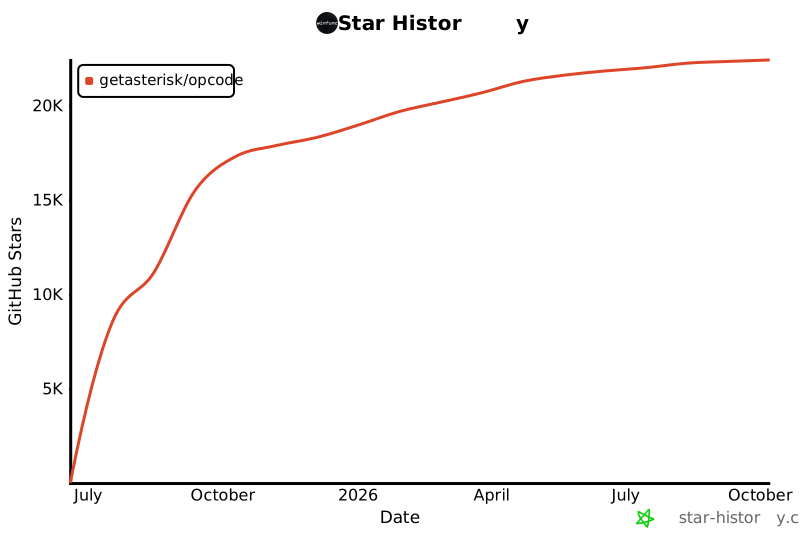
## Star History
[](https://www.star-history.com/#getAsterisk/opcode&Date)