discover · compare · collections · requirements · contribute · feed · watching · stats · help with your tokens
ppoffice/hexo-theme-icarus · source
Snapshot 0 · 2026-11-04T12:47:23Z · JavaScript · MIT
Content fingerprint
0007b0cc6ca51d7e5b2841ae76e1cc3244795b682aa288802b9d0d2215947834GitHub description at capture
A simple, delicate, and modern theme for the static site generator Hexo.
README at capture
<p align="center"> <img height="48" src="https://ppoffice.github.io/hexo-theme-icarus/img/logo.svg" alt="Icarus"> </p> <p align="center"> <a href="https://www.npmjs.com/package/hexo-theme-icarus"><img src="https://img.shields.io/npm/v/hexo-theme-icarus" alt="npm version"></a> <a href="https://www.npmjs.com/package/hexo-theme-icarus"><img src="https://img.shields.io/npm/dm/hexo-theme-icarus" alt="npm downloads"></a> <a href="https://github.com/ppoffice/hexo-theme-icarus/actions/workflows/test.yml"><img src="https://github.com/ppoffice/hexo-theme-icarus/actions/workflows/test.yml/badge.svg" alt="Test"></a> <a href="https://github.com/ppoffice/hexo-theme-icarus/blob/master/LICENSE"><img src="https://img.shields.io/npm/l/hexo-theme-icarus" alt="License"></a> </p> <p align="center"> A simple, delicate, and modern theme for the static site generator <a href="https://hexo.io/">Hexo</a>. <br> <a href="https://ppoffice.github.io/hexo-theme-icarus/">Preview</a> · <a href="https://ppoffice.github.io/hexo-theme-icarus/tags/Icarus-User-Guide/">Documentation</a> · <a href="https://github.com/ppoffice/hexo-theme-icarus/discussions">Discussions</a> · <a href="https://github.com/ppoffice/hexo-theme-icarus/blob/master/README.zh-CN.md">简体中文</a> </p> 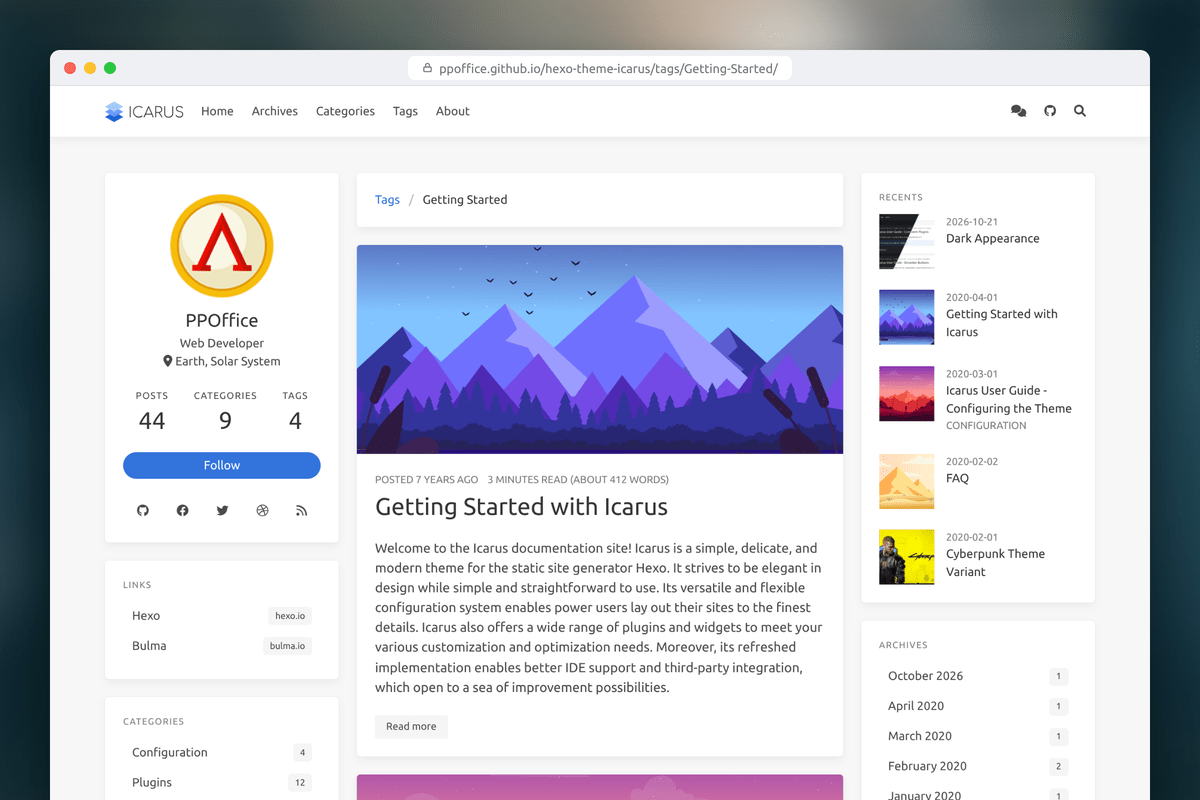 ## Quick Start For a published install, in the root directory of a Hexo site compatible with `^7.1.1 || ^8.0.0`: ```shell npm install hexo-theme-icarus hexo-renderer-inferno hexo config theme icarus hexo server ``` Icarus creates `_config.icarus.yml`, with every option described, on the first run. See [Getting Started](https://ppoffice.github.io/hexo-theme-icarus/uncategorized/getting-started-with-icarus/) for requirements, source installs, and the distinction between published packages and the current development checkout. ## Three Variants One line in `_config.icarus.yml`, or in the front-matter of a single post, switches the whole look. <table> <tr> <td width="33%" valign="top"> <img src="https://ppoffice.github.io/hexo-theme-icarus/gallery/readme/dark.png" alt="The default variant, half light and half dark"> <p><b>Default</b> · <code>variant: default</code><br> The classic Icarus look in light, dark, or <code>appearance: auto</code>, which follows each visitor's system and adds a light/dark switch to the navbar. <a href="https://ppoffice.github.io/hexo-theme-icarus/uncategorized/dark-appearance/">Demo</a></p> </td> <td width="33%" valign="top"> <img src="https://ppoffice.github.io/hexo-theme-icarus/gallery/readme/cyberpunk.png" alt="The Cyberpunk variant"> <p><b>Cyberpunk</b> · <code>variant: cyberpunk</code><br> Always dark: neon colors, HUD panels with chamfered corners, scanlines, and its own code palette. <a href="https://ppoffice.github.io/hexo-theme-icarus/uncategorized/cyberpunk-theme-variant/">Demo</a></p> </td> <td width="33%" valign="top"> <img src="https://ppoffice.github.io/hexo-theme-icarus/gallery/readme/m3e.png" alt="The Material 3 Expressive variant, half light and half dark"> <p><b>Material 3 Expressive</b> · <code>variant: m3e</code><br> Tinted surfaces, rounded cards, and pill-shaped controls that change shape on hover and keyboard focus, with light and dark schemes. <a href="https://ppoffice.github.io/hexo-theme-icarus/uncategorized/material-3-expressive-theme-variant/">Demo</a></p> </td> </tr> </table> ## Highlights <table> <tr> <td width="33%" valign="top"> <img src="https://ppoffice.github.io/hexo-theme-icarus/gallery/readme/responsive.png" alt="Responsive layout on a desktop and a phone"> <p><b>Responsive</b><br> One to three columns, navbar sub-menus that fold into a menu button, an optional sticky navbar, and a mobile table of contents.</p> </td> <td width="33%" valign="top"> <img src="https://ppoffice.github.io/hexo-theme-icarus/gallery/readme/config.png" alt="Per-page configuration"> <p><b>Configure per page</b><br> Set options site-wide, override them per layout in <code>_config.post.yml</code>, or per post in its front-matter.</p> </td> <td width="33%" valign="top"> <img src="https://ppoffice.github.io/hexo-theme-icarus/gallery/readme/plugins.png" alt="Giscus comments, Insight search, gallery, sharing, donation buttons, MathJax and widgets"> <p><b>50+ plugins built in</b><br> Comments, search, sharing, donations, analytics and widgets, ready to switch on in the config.</p> </td> </tr> </table> Also built in: - **Fast navigation**: PJAX page loading with scroll restoration on Back/Forward, and page prefetching on hover. - **Reading**: a reading progress bar, folded code blocks with a preview, and a notice on posts that have not been updated for a long time. - **Math and images**: KaTeX or MathJax 4, and lightGallery 3 with Justified Gallery. - **Privacy**: in `opt-in` mode, Cookie Consent loads the built-in analytics only after visitors allow them; Web Share shares without a third-party SDK. - **Accessible**: keyboard navigation, screen reader labels, `/` or Ctrl+K to search, and translations into 17 languages. <details> <summary><b>Supported integrations</b></summary> | Type | Integrations | |---|---| | [Comment](https://ppoffice.github.io/hexo-theme-icarus/categories/Plugins/Comment/) | Artalk, Beaudar, Changyan, Disqus, DisqusJS, Giscus, Gitalk 2 (preview), Isso, LiveRe, Twikoo, Utterances, Waline | | [Search](https://ppoffice.github.io/hexo-theme-icarus/categories/Plugins/Search/) | Algolia, Baidu, Google CSE, Insight (built-in) | | [Share](https://ppoffice.github.io/hexo-theme-icarus/categories/Plugins/Share/) | AddToAny, ShareThis, Web Share | | [Donate](https://ppoffice.github.io/hexo-theme-icarus/categories/Plugins/Donation/) | Afdian, Alipay, Buy Me a Coffee, Patreon, PayPal, WeChat Pay | | [Analytics](https://ppoffice.github.io/hexo-theme-icarus/Plugins/Analytics/icarus-user-guide-web-analytics-plugins/) | Baidu Statistics, Bing Webmaster, BuSuanZi, CNZZ (Umeng+), Google Analytics, Hotjar, Matomo, StatCounter, X (Twitter) Conversion Tracking, Umami, Waline page views | | [Widgets](https://ppoffice.github.io/hexo-theme-icarus/categories/Widgets/) | Profile, Table of Contents, Recent Posts, Archives, Categories, Tags, GitHub Contributions, Links, Google AdSense, follow.it | | [Others](https://ppoffice.github.io/hexo-theme-icarus/categories/Plugins/) | Back to Top, Cookie Consent, Gallery (lightGallery + Justified Gallery), KaTeX, MathJax 4, Browser Capability Notice, Page Loading Animations, PJAX, Page Prefetching, Progress Bar | Most integrations are provided by [hexo-component-inferno](https://github.com/ppoffice/hexo-component-inferno). </details> ## Documentation [Getting Started](https://ppoffice.github.io/hexo-theme-icarus/uncategorized/getting-started-with-icarus/) · [Configuring the Theme](https://ppoffice.github.io/hexo-theme-icarus/Configuration/icarus-user-guide-configuring-the-theme/) · [Upgrade Guide](https://ppoffice.github.io/hexo-theme-icarus/uncategorized/upgrade-guide/) · [FAQ](https://ppoffice.github.io/hexo-theme-icarus/uncategorized/faq/) · [Demos](https://ppoffice.github.io/hexo-theme-icarus/tags/Demo/) · [All Guides](https://ppoffice.github.io/hexo-theme-icarus/tags/Icarus-User-Guide/) ## Contributing Bug reports, feature ideas, [translations](https://github.com/ppoffice/hexo-theme-icarus/tree/master/languages) and [tutorials](https://github.com/ppoffice/hexo-theme-icarus/new/site/source/_posts) are all welcome. Open an [issue](https://github.com/ppoffice/hexo-theme-icarus/issues/new/choose) or a pull request. Icarus is built with [Hexo](https://hexo.io/), [Inferno](https://infernojs.org/), [Stylus](https://stylus-lang.com/) and [Bulma](https://bulma.io/). To work on it: ```shell npm ci npm run lint npm test # unit and integration tests npm run test:e2e # browser tests; run "npx playwright install chromium" once first ``` The tests need Node.js 20.19 or later. See the [contributing guide](https://github.com/ppoffice/hexo-theme-icarus/blob/master/CONTRIBUTING.md) for code style and commit conventions. ## License [MIT](https://github.com/ppoffice/hexo-theme-icarus/blob/master/LICENSE)