discover · compare · collections · requirements · contribute · feed · watching · stats · help with your tokens
pass-with-high-score/blockads-android · source
Snapshot 0 · 2026-11-04T12:47:28Z · Kotlin · GPL-3.0
Content fingerprint
aa149c82c8cf33e11c06b7b873e3cc25aab003caad9120eb3e57bd027f566525GitHub description at capture
Block ads system-wide on Android using local VPN-based DNS filtering. No root needed. No data collection.
README at capture
<div align="center">
<img src="fastlane/metadata/android/en-US/images/icon.png" width="128" height="128">
<h1>BlockAds</h1>
<p><strong>BlockAds</strong> is a free, open-source ad blocker for Android.</p>
<p>It blocks ads, trackers, and malware system-wide using local VPN-based DNS filtering — no root required, no data collection.</p>
<p>Built with Jetpack Compose and Material 3 for a modern, premium experience.</p>
<br><br>
<a href="https://github.com/pass-with-high-score/blockads-android/releases">
<img src="https://img.shields.io/github/v/release/pass-with-high-score/blockads-android?filter=v*">
</a>
<a href="https://github.com/pass-with-high-score/blockads-android/releases">
<img src="https://img.shields.io/github/downloads/pass-with-high-score/blockads-android/total">
</a>
<br><br>
<h4>Download</h4>
<a href="https://f-droid.org/packages/app.pwhs.blockads">
<img src="https://fdroid.gitlab.io/artwork/badge/get-it-on.png" height="80" alt="Get it on F-Droid">
</a>
<a href="https://github.com/pass-with-high-score/blockads-android/releases">
<img src="https://raw.githubusercontent.com/NeoApplications/Neo-Backup/034b226cea5c1b30eb4f6a6f313e4dadcbb0ece4/badge_github.png" height="80">
</a>
<br><br>
<a href="https://apt.izzysoft.de/packages/app.pwhs.blockads">
<img src="https://gitlab.com/IzzyOnDroid/repo/-/raw/master/assets/IzzyOnDroidButtonGreyBorder_nofont.png" height="54" alt="Get it at IzzyOnDroid">
</a>
</div>
---
## Screenshots
<div align="center">
<img src="fastlane/metadata/android/en-US/images/phoneScreenshots/1.png" width="200">
<img src="fastlane/metadata/android/en-US/images/phoneScreenshots/2.png" width="200">
<img src="fastlane/metadata/android/en-US/images/phoneScreenshots/3.png" width="200">
<img src="fastlane/metadata/android/en-US/images/phoneScreenshots/4.png" width="200">
<img src="fastlane/metadata/android/en-US/images/phoneScreenshots/5.png" width="200">
<img src="fastlane/metadata/android/en-US/images/phoneScreenshots/6.png" width="200">
</div>
---
## Features
* Dual Routing Modes: System-wide ad blocking via VPN (no root needed) OR Root Proxy Mode (via iptables)
* Privacy-first Optional Crash Reporting & Manual Local Logs Export
* Comprehensive Onboarding Flow (Permissions, Battery Optimization, Opt-in telemetry)
* WireGuard Profile Import
* HTTPS Filtering with userspace TCP/IP stack — per-app MITM, cosmetic CSS, JS scriptlets
* CA cert install verification (auto-refresh after returning from Settings)
* 284-domain curated passthrough list keeps banking, payments and gov apps working
* Multiple built-in filter lists (StevenBlack, AdGuard DNS, EasyList, and more)
* Region-aware defaults — auto-enables filters for your language
* Real-time DNS query logs with search & filtering
* Security protection — blocks phishing, malware, and malvertising domains
* Dark / Light / System theme with Material 3 dynamic colors
* 7 accent color options + Material You dynamic theming
* Quick Settings tile & home screen widget
* Custom block/allow rules and whitelisting
* Per-app filtering (bypass VPN for selected apps)
* DNS-over-HTTPS (DoH) support with multiple providers
* Auto-update filter lists on schedule (6h / 12h / 24h / 48h)
* Export / Import settings backup
* Auto-reconnect on boot
* Multi-language support (English, Vietnamese, Japanese, Korean, Chinese, Thai, Spanish)
* 100% local — all data stays on your device
---
## Community
Join our community:
[](https://www.reddit.com/r/BlockAds/)
[](https://t.me/blockads_android)
## Sponsor
If you enjoy BlockAds, consider supporting the project! Your sponsorship helps us maintain and
improve the app.
[](https://github.com/sponsors/pass-with-high-score)
## Build Instructions
### Requirements
* [Android Studio](https://developer.android.com/studio) Ladybug or newer
* JDK 17 or higher
* Android SDK 36 (min SDK 24)
* *(Optional - only needed if modifying Go tunnel)* [Go](https://go.dev/doc/install) 1.23+ and [gomobile](https://pkg.go.dev/golang.org/x/mobile/cmd/gomobile)
### Steps
> [!TIP]
> Historical versions of the Go binary (`tunnel.aar`) were committed in the past before being moved to GitHub Releases. To avoid downloading ~1.2GB of old binaries, **use blobless clone (`--filter=blob:limit=1m`)** to download only ~20MB.
1. Clone the repository:
```bash
git clone --filter=blob:limit=1m https://github.com/pass-with-high-score/blockads-android.git
cd blockads-android
```
*(Or for a shallow clone: `git clone --depth=1 https://github.com/pass-with-high-score/blockads-android.git`)*
2. **(Optional)** Build the Go tunnel AAR/JAR from source (with Android 15 16KB page size support):
```bash
./scripts/build_tunnel.sh
# Or
./gradlew -Ptunnel.source=local buildGoTunnel
```
*Note: This is completely optional. Gradle automatically resolves a prebuilt, checksum-pinned `tunnel.aar` from GitHub Releases by default. You do not need Go or NDK unless you are modifying Go code in `tunnel/`. See [docs/TUNNEL.md](docs/TUNNEL.md).*
3. Open the project in Android Studio
4. Sync Gradle and run the app on a device or emulator
5. Build from command line:
```bash
./gradlew assembleDebug
./gradlew bundleRelease # requires signing key
```
---
## How It Works
BlockAds routes DNS queries locally either through a VpnService (Vpn Mode) or via iptables redirection (Root Proxy Mode). These queries are matched against loaded filter lists using a memory-efficient Trie data structure. Matching queries are blocked locally, while all other traffic passes through normally — no data leaves your device.
When HTTPS Filtering is enabled, a userspace TCP/IP stack (gVisor netstack via tun2socks) terminates each TCP/UDP flow in Go, looks up the owning app UID via Android's `ConnectivityManager.getConnectionOwnerUid()`, and only MITMs flows from selected browsers. Cert-pinned apps and the 284-domain curated passthrough list bypass MITM cleanly. Cosmetic CSS rules and EasyList `##+js(…)` / AdGuard `#%#//scriptlet(…)` scriptlets are injected into HTML responses via a tiny in-memory local asset host.
---
## License
This project is licensed under the **GNU General Public License v3.0**.
You are free to use, modify, and distribute it under the terms of the license.
See the full [LICENSE](LICENSE) file for details.
---
## Credits
* Developed and maintained by [Nguyen Quang Minh](https://github.com/nqmgaming)
* Built with [Jetpack Compose](https://developer.android.com/jetpack/compose), [Koin](https://insert-koin.io/), and [Compose Destinations](https://github.com/raamcosta/compose-destinations)
---
## Contributing
Pull requests and issue reports are welcome.
Help us improve BlockAds!
### Help us translate BlockAds
Want to see BlockAds in your language?
Open an issue or submit a PR with your translations.
---
## Star History
[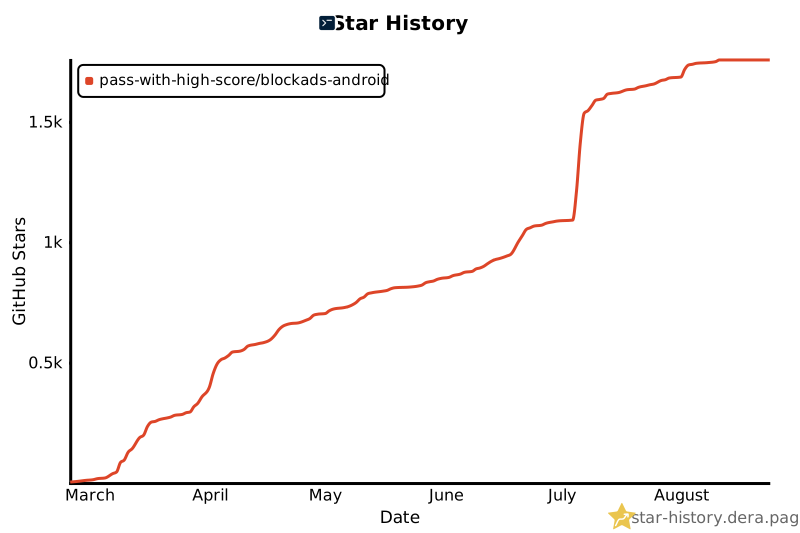](https://star-history.dera.page/#pass-with-high-score/blockads-android&Date)