discover · compare · collections · requirements · contribute · feed · watching · stats · help with your tokens
oobabooga/textgen · source
Snapshot 0 · 2026-11-04T12:47:27Z · Python · AGPL-3.0
Content fingerprint
af5861e3628130552b39519a92a735f8149cc5d577ad2549bf7a65c858a1d910GitHub description at capture
Open-source desktop app for local LLMs. Text, vision, tool-calling, OpenAI/Anthropic-compatible API. 100% private.
README at capture
# TextGen
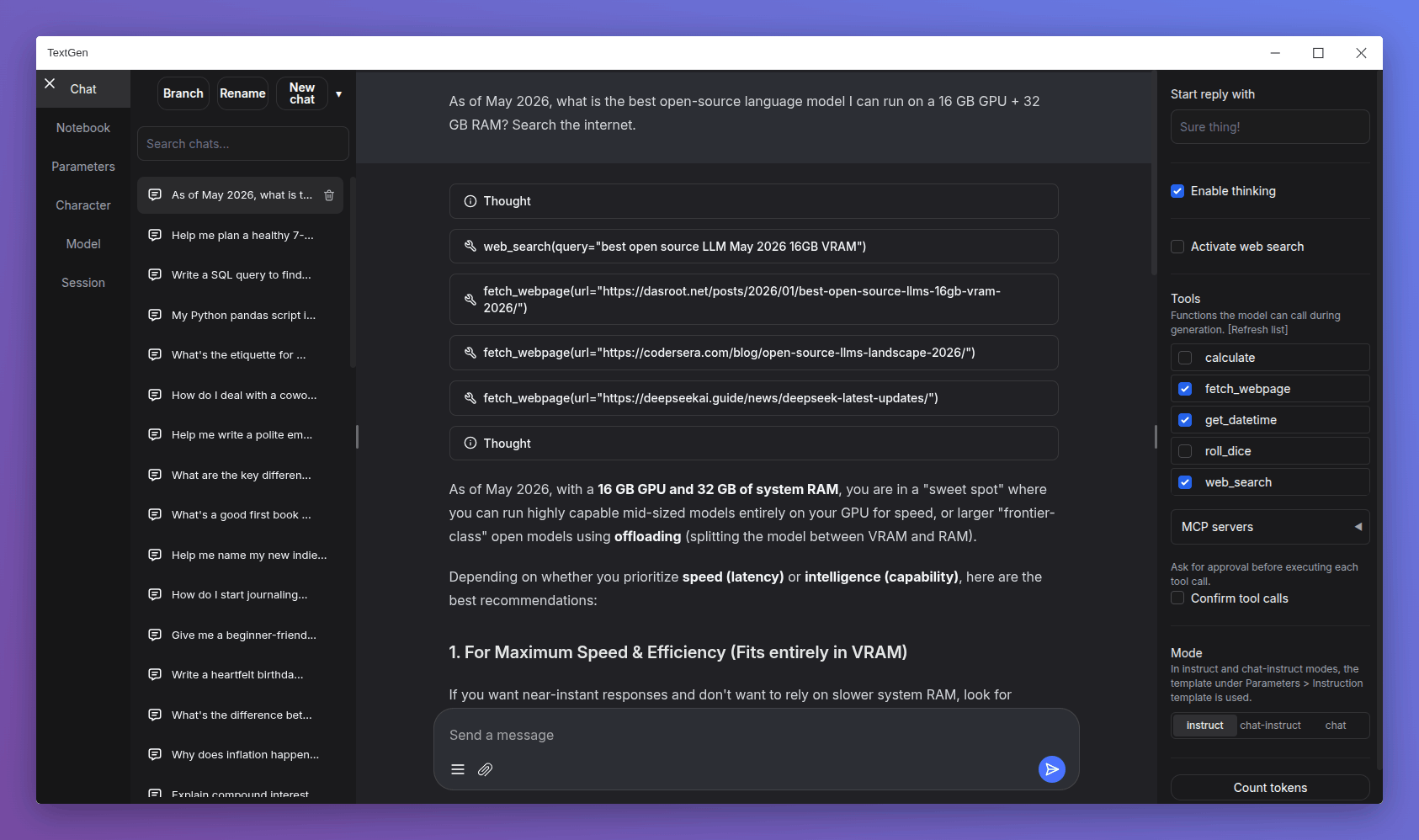
**A desktop app for local LLMs. Open source, no telemetry.** Text, vision, tool-calling, web search. UI + API.
[](https://github.com/oobabooga/textgen)
[](https://raw.githubusercontent.com/oobabooga/screenshots/refs/heads/main/CHAT-4.8.png)
## Get started in 1 minute
Download, unzip, double-click `textgen`. A window opens.
**https://github.com/oobabooga/textgen/releases**
Portable builds for Linux, Windows, and macOS with CUDA, Vulkan, ROCm, and CPU-only options. All dependencies included. Compatible with GGUF (llama.cpp) models.
For additional backends (ExLlamaV3, Transformers), training, image generation, and extensions, see [Installation](#installation).
## Features
### Chat & generation
- `instruct` mode for instruction-following (like ChatGPT), and `chat-instruct`/`chat` modes for talking to custom characters. Prompts are automatically formatted with Jinja2 templates.
- **Vision (multimodal)**: Attach images to messages for visual understanding ([tutorial](https://github.com/oobabooga/textgen/wiki/Multimodal-Tutorial)).
- **File attachments**: Upload text files, PDF documents, and .docx documents to talk about their contents.
- Edit messages, navigate between message versions, and branch conversations at any point.
- Notebook tab for free-form text generation outside of chat turns.
### Backends & API
- **Multiple backends**: [llama.cpp](https://github.com/ggerganov/llama.cpp), [ik_llama.cpp](https://github.com/ikawrakow/ik_llama.cpp), [Transformers](https://github.com/huggingface/transformers), [ExLlamaV3](https://github.com/turboderp-org/exllamav3), and [TensorRT-LLM](https://github.com/NVIDIA/TensorRT-LLM). Switch between backends and models without restarting.
- **OpenAI/Anthropic-compatible API**: Chat, Completions, and Messages endpoints with tool-calling support. Use as a local drop-in replacement for the OpenAI/Anthropic APIs ([examples](https://github.com/oobabooga/textgen/wiki/12-%E2%80%90-OpenAI-API#examples)).
- **Tool-calling**: Models can call custom functions during chat, including web search, page fetching, and math. Each tool is a single `.py` file. MCP servers are also supported ([tutorial](https://github.com/oobabooga/textgen/wiki/Tool-Calling-Tutorial)).
### Training & image generation
- **Training**: Fine-tune LoRAs on multi-turn chat or raw text datasets. Supports resuming interrupted runs ([tutorial](https://github.com/oobabooga/textgen/wiki/05-%E2%80%90-Training-Tab)).
- **Image generation**: A dedicated tab for `diffusers` models like **Z-Image-Turbo**. Features 4-bit/8-bit quantization and a persistent gallery with image metadata ([tutorial](https://github.com/oobabooga/textgen/wiki/Image-Generation-Tutorial)).
### Privacy & interface
- 100% offline and private, with zero telemetry, external resources, or remote update requests.
- Dark/light themes, syntax highlighting for code blocks, and LaTeX rendering for mathematical expressions.
- Built-in and community [extensions](https://github.com/oobabooga/textgen/wiki/07-%E2%80%90-Extensions) including TTS, voice input, and translation. See the [extensions directory](https://github.com/oobabooga/textgen-extensions) for the full list.
## Downloading models
1. Download a GGUF model file from [Hugging Face](https://huggingface.co/models?pipeline_tag=text-generation&sort=downloads&search=gguf).
2. Place it in the `user_data/models` folder.
That's it. The UI will detect it automatically.
For recommended GGUF quants, check out [LocalBench](https://localbench.substack.com). To estimate how much memory a model will use, try the [GGUF Memory Calculator](https://huggingface.co/spaces/oobabooga/accurate-gguf-vram-calculator).
<details>
<summary>Other model types (Transformers, EXL3)</summary>
Models that consist of multiple files (like 16-bit Transformers models and EXL3 models) should be placed in a subfolder inside `user_data/models`:
```
textgen
└── user_data
└── models
└── Qwen_Qwen3-8B
├── config.json
├── generation_config.json
├── model-00001-of-00004.safetensors
├── ...
├── tokenizer_config.json
└── tokenizer.json
```
These formats require the full installation (not the portable build).
</details>
## Installation
For the desktop app, see the [portable builds](https://github.com/oobabooga/textgen/releases). The options below run the web UI in your browser instead.
### Manual portable install with venv
Fast setup on any Python 3.9+:
```bash
# Clone repository
git clone https://github.com/oobabooga/textgen
cd textgen
# Create virtual environment
python -m venv venv
# Activate virtual environment
# On Windows:
venv\Scripts\activate
# On macOS/Linux:
source venv/bin/activate
# Install dependencies (choose appropriate file under requirements/portable for your hardware)
pip install -r requirements/portable/requirements.txt --upgrade
# Launch server (basic command)
python server.py --portable --api --auto-launch
# When done working, deactivate
deactivate
```
### Full installation
For users who need additional backends (ExLlamaV3, Transformers), training, image generation, or extensions like TTS, voice input, and translation. Requires ~10GB disk space and downloads PyTorch.
<details>
<summary>Installation details</summary>
### One-click installer
1. Clone the repository, or [download its source code](https://github.com/oobabooga/textgen/archive/refs/heads/main.zip) and extract it.
2. Run the startup script for your OS: `start_windows.bat`, `start_linux.sh`, or `start_macos.sh`.
3. When prompted, select your GPU vendor.
4. After installation, open `http://127.0.0.1:7860` in your browser.
After installation:
* **Restart**: run the same `start_` script.
* **Pass command-line flags**: directly (e.g., `./start_linux.sh --help`), or persist them in `user_data/CMD_FLAGS.txt` (e.g., `--api` to enable the API).
* **Update**: run the update script for your OS (`update_wizard_windows.bat`, `update_wizard_linux.sh`, or `update_wizard_macos.sh`).
* **Reinstall from scratch**: delete the `installer_files` folder and run the `start_` script again.
* **Install extension requirements**: use the update wizard's "Install/update extensions requirements" option. It reinstalls the main project requirements at the end to ensure they take precedence over conflicting extension dependencies.
Notes:
* These scripts (`start_`, `update_wizard_`, `cmd_`) don't need to run as admin/root.
* For automated installation, set the `GPU_CHOICE`, `LAUNCH_AFTER_INSTALL`, and `INSTALL_EXTENSIONS` environment variables. Example: `GPU_CHOICE=A LAUNCH_AFTER_INSTALL=FALSE INSTALL_EXTENSIONS=TRUE ./start_linux.sh`.
* Under the hood, the script uses Miniforge to set up a Conda environment in `installer_files/`. To run anything manually in this environment, launch an interactive shell using `cmd_linux.sh`, `cmd_windows.bat`, or `cmd_macos.sh`.
### Full installation with Conda
#### 0. Install Conda
https://github.com/conda-forge/miniforge
On Linux or WSL, Miniforge can be automatically installed with these two commands:
```
curl -sL "https://github.com/conda-forge/miniforge/releases/latest/download/Miniforge3-Linux-x86_64.sh" > "Miniforge3.sh"
bash Miniforge3.sh
```
For other platforms, download from: https://github.com/conda-forge/miniforge/releases/latest
#### 1. Create a new conda environment
```
conda create -n textgen python=3.13
conda activate textgen
```
#### 2. Install Pytorch
| System | GPU | Command |
|--------|---------|---------|
| Linux/WSL | NVIDIA | `pip3 install torch==2.9.1 --index-url https://download.pytorch.org/whl/cu128` |
| Linux/WSL | CPU only | `pip3 install torch==2.9.1 --index-url https://download.pytorch.org/whl/cpu` |
| Linux | AMD | `pip3 install https://repo.radeon.com/rocm/manylinux/rocm-rel-7.2/torch-2.9.1%2Brocm7.2.0.lw.git7e1940d4-cp313-cp313-linux_x86_64.whl` |
| MacOS + MPS | Any | `pip3 install torch==2.9.1` |
| Windows | NVIDIA | `pip3 install torch==2.9.1 --index-url https://download.pytorch.org/whl/cu128` |
| Windows | CPU only | `pip3 install torch==2.9.1` |
The up-to-date commands can be found here: https://pytorch.org/get-started/locally/.
If you need `nvcc` to compile some library manually, you will additionally need to install this:
```
conda install -y -c "nvidia/label/cuda-12.8.1" cuda
```
#### 3. Install the web UI
```
git clone https://github.com/oobabooga/textgen
cd textgen
pip install -r requirements/full/<requirements file according to table below>
```
Requirements file to use:
| GPU | requirements file to use |
|--------|---------|
| NVIDIA | `requirements.txt` |
| AMD | `requirements_amd.txt` |
| CPU only | `requirements_cpu_only.txt` |
| Apple Intel | `requirements_apple_intel.txt` |
| Apple Silicon | `requirements_apple_silicon.txt` |
#### 4. Start the web UI
```
conda activate textgen
cd textgen
python server.py
```
Then browse to `http://127.0.0.1:7860`.
#### Manual compilation
The `requirements*.txt` files above contain wheels precompiled through GitHub Actions. To compile manually (e.g., if no wheels are available for your hardware), use `requirements_nowheels.txt` and install your desired loaders manually.
#### Updating the requirements
From time to time, the `requirements*.txt` files change. To update:
```
conda activate textgen
cd textgen
pip install -r <requirements file that you have used> --upgrade
```
### Docker
```
For NVIDIA GPU:
ln -s docker/{nvidia/Dockerfile,nvidia/docker-compose.yml,.dockerignore} .
For AMD GPU:
ln -s docker/{amd/Dockerfile,amd/docker-compose.yml,.dockerignore} .
For Intel GPU:
ln -s docker/{intel/Dockerfile,intel/docker-compose.yml,.dockerignore} .
For CPU only
ln -s docker/{cpu/Dockerfile,cpu/docker-compose.yml,.dockerignore} .
cp docker/.env.example .env
#Create logs/cache dir :
mkdir -p user_data/logs user_data/cache
# Edit .env and set:
# TORCH_CUDA_ARCH_LIST based on your GPU model
# APP_RUNTIME_GID your host user's group id (run `id -g` in a terminal)
# BUILD_EXTENIONS optionally add comma separated list of extensions to build
# Edit user_data/CMD_FLAGS.txt and add in it the options you want to execute (like --listen --cpu)
#
docker compose up --build
```
* You need to have Docker Compose v2.17 or higher installed. See [this guide](https://github.com/oobabooga/textgen/wiki/09-%E2%80%90-Docker) for instructions.
* For additional docker files, check out [this repository](https://github.com/Atinoda/text-generation-webui-docker).
</details>
## Command-line flags
<details>
<summary>Show full list</summary>
```txt
usage: server.py [-h] [--user-data-dir USER_DATA_DIR] [--multi-user] [--model MODEL] [--lora LORA [LORA ...]] [--model-dir MODEL_DIR] [--lora-dir LORA_DIR] [--model-menu] [--settings SETTINGS]
[--extensions EXTENSIONS [EXTENSIONS ...]] [--verbose] [--idle-timeout IDLE_TIMEOUT] [--image-model IMAGE_MODEL] [--image-model-dir IMAGE_MODEL_DIR] [--image-dtype {bfloat16,float16}]
[--image-attn-backend {flash_attention_2,sdpa}] [--image-cpu-offload] [--image-compile] [--image-quant {none,bnb-8bit,bnb-4bit,torchao-int8wo,torchao-fp4,torchao-float8wo}]
[--loader LOADER] [--ctx-size N] [--cache-type N] [--model-draft MODEL_DRAFT] [--draft-max DRAFT_MAX] [--gpu-layers-draft GPU_LAYERS_DRAFT] [--device-draft DEVICE_DRAFT]
[--ctx-size-draft CTX_SIZE_DRAFT] [--spec-type {none,ngram-mod,ngram-simple,ngram-map-k,ngram-map-k4v,ngram-cache}] [--spec-ngram-size-n SPEC_NGRAM_SIZE_N]
[--spec-ngram-size-m SPEC_NGRAM_SIZE_M] [--spec-ngram-min-hits SPEC_NGRAM_MIN_HITS] [--gpu-layers N] [--cpu-moe] [--mmproj MMPROJ] [--streaming-llm] [--tensor-split TENSOR_SPLIT]
[--split-mode {layer,row,tensor,none}] [--no-mmap] [--mlock] [--no-kv-offload] [--batch-size BATCH_SIZE] [--ubatch-size UBATCH_SIZE] [--threads THREADS]
[--threads-batch THREADS_BATCH] [--numa] [--parallel PARALLEL] [--fit-target FIT_TARGET] [--extra-flags EXTRA_FLAGS] [--ik] [--cpu] [--cpu-memory CPU_MEMORY] [--disk]
[--disk-cache-dir DISK_CACHE_DIR] [--load-in-8bit] [--bf16] [--no-cache] [--trust-remote-code] [--force-safetensors] [--no_use_fast] [--attn-implementation IMPLEMENTATION]
[--load-in-4bit] [--use_double_quant] [--compute_dtype COMPUTE_DTYPE] [--quant_type QUANT_TYPE] [--gpu-split GPU_SPLIT] [--enable-tp] [--tp-backend TP_BACKEND] [--cfg-cache]
[--listen] [--listen-port LISTEN_PORT] [--listen-host LISTEN_HOST] [--share] [--auto-launch] [--gradio-auth GRADIO_AUTH] [--gradio-auth-path GRADIO_AUTH_PATH]
[--ssl-keyfile SSL_KEYFILE] [--ssl-certfile SSL_CERTFILE] [--subpath SUBPATH] [--old-colors] [--portable] [--api] [--public-api] [--public-api-id PUBLIC_API_ID] [--api-port API_PORT]
[--api-key API_KEY] [--admin-key ADMIN_KEY] [--api-enable-ipv6] [--api-disable-ipv4] [--nowebui] [--temperature N] [--dynatemp-low N] [--dynatemp-high N] [--dynatemp-exponent N]
[--smoothing-factor N] [--smoothing-curve N] [--top-p N] [--top-k N] [--min-p N] [--top-n-sigma N] [--typical-p N] [--xtc-threshold N] [--xtc-probability N] [--epsilon-cutoff N]
[--eta-cutoff N] [--tfs N] [--top-a N] [--adaptive-target N] [--adaptive-decay N] [--dry-multiplier N] [--dry-allowed-length N] [--dry-base N] [--repetition-penalty N]
[--frequency-penalty N] [--presence-penalty N] [--encoder-repetition-penalty N] [--no-repeat-ngram-size N] [--repetition-penalty-range N] [--penalty-alpha N] [--guidance-scale N]
[--mirostat-mode N] [--mirostat-tau N] [--mirostat-eta N] [--do-sample | --no-do-sample] [--dynamic-temperature | --no-dynamic-temperature]
[--temperature-last | --no-temperature-last] [--sampler-priority N] [--dry-sequence-breakers N] [--enable-thinking | --no-enable-thinking] [--reasoning-effort N]
[--preserve-thinking | --no-preserve-thinking] [--chat-template-file CHAT_TEMPLATE_FILE] [--no-electron]
TextGen
options:
-h, --help show this help message and exit
Basic settings:
--user-data-dir USER_DATA_DIR Path to the user data directory. Default: auto-detected.
--multi-user Multi-user mode. Chat histories are not saved or automatically loaded. Best suited for small trusted teams.
--model MODEL Name of the model to load by default.
--lora LORA [LORA ...] The list of LoRAs to load. If you want to load more than one LoRA, write the names separated by spaces.
--model-dir MODEL_DIR Path to directory with all the models.
--lora-dir LORA_DIR Path to directory with all the loras.
--model-menu Show a model menu in the terminal when the web UI is first launched.
--settings SETTINGS Load the default interface settings from this yaml file. See user_data/settings-template.yaml for an example. If you create a file called
user_data/settings.yaml, this file will be loaded by default without the need to use the --settings flag.
--extensions EXTENSIONS [EXTENSIONS ...] The list of extensions to load. If you want to load more than one extension, write the names separated by spaces.
--verbose Print the prompts to the terminal.
--idle-timeout IDLE_TIMEOUT Unload model after this many minutes of inactivity. It will be automatically reloaded when you try to use it again.
Image model:
--image-model IMAGE_MODEL Name of the image model to select on startup (overrides saved setting).
--image-model-dir IMAGE_MODEL_DIR Path to directory with all the image models.
--image-dtype {bfloat16,float16} Data type for image model.
--image-attn-backend {flash_attention_2,sdpa} Attention backend for image model.
--image-cpu-offload Enable CPU offloading for image model.
--image-compile Compile the image model for faster inference.
--image-quant {none,bnb-8bit,bnb-4bit,torchao-int8wo,torchao-fp4,torchao-float8wo}
Quantization method for image model.
Model loader:
--loader LOADER Choose the model loader manually, otherwise, it will get autodetected. Valid options: Transformers, llama.cpp, ExLlamav3_HF, ExLlamav3, TensorRT-
LLM.
Context and cache:
--ctx-size, --n_ctx, --max_seq_len N Context size in tokens. 0 = auto for llama.cpp (requires gpu-layers=-1), 8192 for other loaders.
--cache-type, --cache_type N KV cache type; valid options: llama.cpp - fp16, q8_0, q4_0; ExLlamaV3 - fp16, q2 to q8 (can specify k_bits and v_bits separately, e.g. q4_q8).
Speculative decoding:
--model-draft MODEL_DRAFT Path to the draft model for speculative decoding.
--draft-max DRAFT_MAX Number of tokens to draft for speculative decoding.
--gpu-layers-draft GPU_LAYERS_DRAFT Number of layers to offload to the GPU for the draft model.
--device-draft DEVICE_DRAFT Comma-separated list of devices to use for offloading the draft model. Example: CUDA0,CUDA1
--ctx-size-draft CTX_SIZE_DRAFT Size of the prompt context for the draft model. If 0, uses the same as the main model.
--spec-type {none,ngram-mod,ngram-simple,ngram-map-k,ngram-map-k4v,ngram-cache}
Draftless speculative decoding type. Recommended: ngram-mod.
--spec-ngram-size-n SPEC_NGRAM_SIZE_N N-gram lookup size for ngram speculative decoding.
--spec-ngram-size-m SPEC_NGRAM_SIZE_M Draft n-gram size for ngram speculative decoding.
--spec-ngram-min-hits SPEC_NGRAM_MIN_HITS Minimum n-gram hits for ngram-map speculative decoding.
llama.cpp:
--gpu-layers, --n-gpu-layers N Number of layers to offload to the GPU. -1 = auto.
--cpu-moe Move the experts to the CPU (for MoE models).
--mmproj MMPROJ Path to the mmproj file for vision models.
--streaming-llm Activate StreamingLLM to avoid re-evaluating the entire prompt when old messages are removed.
--tensor-split TENSOR_SPLIT Split the model across multiple GPUs. Comma-separated list of proportions. Example: 60,40.
--split-mode {layer,row,tensor,none} How to split the model across multiple GPUs. "tensor" can make multi-GPU significantly faster.
--no-mmap Prevent mmap from being used.
--mlock Force the system to keep the model in RAM.
--no-kv-offload Do not offload the K, Q, V to the GPU. This saves VRAM but reduces performance.
--batch-size BATCH_SIZE Maximum number of prompt tokens to batch together when calling llama-server. This is the application level batch size.
--ubatch-size UBATCH_SIZE Maximum number of prompt tokens to batch together when calling llama-server. This is the max physical batch size for computation (device level).
--threads THREADS Number of threads to use.
--threads-batch THREADS_BATCH Number of threads to use for batches/prompt processing.
--numa Activate NUMA task allocation for llama.cpp.
--parallel PARALLEL Number of parallel request slots. The context size is divided equally among slots. For example, to have 4 slots with 8192 context each, set
ctx_size to 32768.
--fit-target FIT_TARGET Target VRAM margin per device for auto GPU layers, comma-separated list of values in MiB. A single value is broadcast across all devices.
--extra-flags EXTRA_FLAGS Extra flags to pass to llama-server. Example: "--jinja --rpc 192.168.1.100:50052"
--ik Use ik_llama.cpp instead of upstream llama.cpp. Requires the ik_llama_cpp_binaries package to be installed.
Transformers/Accelerate:
--cpu Use the CPU to generate text. Warning: Training on CPU is extremely slow.
--cpu-memory CPU_MEMORY Maximum CPU memory in GiB. Use this for CPU offloading.
--disk If the model is too large for your GPU(s) and CPU combined, send the remaining layers to the disk.
--disk-cache-dir DISK_CACHE_DIR Directory to save the disk cache to.
--load-in-8bit Load the model with 8-bit precision (using bitsandbytes).
--bf16 Load the model with bfloat16 precision. Requires NVIDIA Ampere GPU.
--no-cache Set use_cache to False while generating text. This reduces VRAM usage slightly, but it comes at a performance cost.
--trust-remote-code Set trust_remote_code=True while loading the model. Necessary for some models.
--force-safetensors Set use_safetensors=True while loading the model. This prevents arbitrary code execution.
--no_use_fast Set use_fast=False while loading the tokenizer (it's True by default). Use this if you have any problems related to use_fast.
--attn-implementation IMPLEMENTATION Attention implementation. Valid options: sdpa, eager, flash_attention_2.
bitsandbytes 4-bit:
--load-in-4bit Load the model with 4-bit precision (using bitsandbytes).
--use_double_quant use_double_quant for 4-bit.
--compute_dtype COMPUTE_DTYPE compute dtype for 4-bit. Valid options: bfloat16, float16, float32.
--quant_type QUANT_TYPE quant_type for 4-bit. Valid options: nf4, fp4.
ExLlamaV3:
--gpu-split GPU_SPLIT Comma-separated list of VRAM (in GB) to use per GPU device for model layers. Example: 20,7,7.
--enable-tp, --enable_tp Enable Tensor Parallelism (TP) to split the model across GPUs.
--tp-backend TP_BACKEND The backend for tensor parallelism. Valid options: native, nccl. Default: native.
--cfg-cache Create an additional cache for CFG negative prompts. Necessary to use CFG with that loader.
Gradio:
--listen Make the web UI reachable from your local network.
--listen-port LISTEN_PORT The listening port that the server will use.
--listen-host LISTEN_HOST The hostname that the server will use.
--share Create a public URL. This is useful for running the web UI on Google Colab or similar.
--auto-launch Open the web UI in the default browser upon launch.
--gradio-auth GRADIO_AUTH Set Gradio authentication password in the format "username:password". Multiple credentials can also be supplied with "u1:p1,u2:p2,u3:p3".
--gradio-auth-path GRADIO_AUTH_PATH Set the Gradio authentication file path. The file should contain one or more user:password pairs in the same format as above.
--ssl-keyfile SSL_KEYFILE The path to the SSL certificate key file.
--ssl-certfile SSL_CERTFILE The path to the SSL certificate cert file.
--subpath SUBPATH Customize the subpath for gradio, use with reverse proxy
--old-colors Use the legacy Gradio colors, before the December/2024 update.
--portable Hide features not available in portable mode like training.
API:
--api Enable the API server.
--public-api Create a public URL for the API using Cloudflare.
--public-api-id PUBLIC_API_ID Tunnel ID for named Cloudflare Tunnel. Use together with public-api option.
--api-port API_PORT The listening port for the API.
--api-key API_KEY API authentication key.
--admin-key ADMIN_KEY API authentication key for admin tasks like loading and unloading models. If not set, will be the same as --api-key.
--api-enable-ipv6 Enable IPv6 for the API
--api-disable-ipv4 Disable IPv4 for the API
--nowebui Do not launch the Gradio UI. Useful for launching the API in standalone mode.
API generation defaults:
--temperature N Temperature
--dynatemp-low N Dynamic temperature low
--dynatemp-high N Dynamic temperature high
--dynatemp-exponent N Dynamic temperature exponent
--smoothing-factor N Smoothing factor
--smoothing-curve N Smoothing curve
--top-p N Top P
--top-k N Top K
--min-p N Min P
--top-n-sigma N Top N Sigma
--typical-p N Typical P
--xtc-threshold N XTC threshold
--xtc-probability N XTC probability
--epsilon-cutoff N Epsilon cutoff
--eta-cutoff N Eta cutoff
--tfs N TFS
--top-a N Top A
--adaptive-target N Adaptive target
--adaptive-decay N Adaptive decay
--dry-multiplier N DRY multiplier
--dry-allowed-length N DRY allowed length
--dry-base N DRY base
--repetition-penalty N Repetition penalty
--frequency-penalty N Frequency penalty
--presence-penalty N Presence penalty
--encoder-repetition-penalty N Encoder repetition penalty
--no-repeat-ngram-size N No repeat ngram size
--repetition-penalty-range N Repetition penalty range
--penalty-alpha N Penalty alpha
--guidance-scale N Guidance scale
--mirostat-mode N Mirostat mode
--mirostat-tau N Mirostat tau
--mirostat-eta N Mirostat eta
--do-sample, --no-do-sample Do sample
--dynamic-temperature, --no-dynamic-temperature Dynamic temperature
--temperature-last, --no-temperature-last Temperature last
--sampler-priority N Sampler priority
--dry-sequence-breakers N DRY sequence breakers
--enable-thinking, --no-enable-thinking Enable thinking
--reasoning-effort N Reasoning effort
--preserve-thinking, --no-preserve-thinking Preserve thinking blocks from prior turns in the chat template
--chat-template-file CHAT_TEMPLATE_FILE Path to a chat template file (.jinja, .jinja2, or .yaml) to use as the default instruction template for API requests. Overrides the model's
built-in template.
Electron:
--no-electron In portable builds, skip the Electron desktop window. Useful if you prefer to use the web UI in the browser.
```
</details>
## Loading a model automatically
To skip the Model tab on every launch, add this to `user_data/CMD_FLAGS.txt`:
```
--model my-model.gguf
```
Replace `my-model.gguf` with the name of a file in `user_data/models`. The model will load on startup.
To pass extra flags, put each on its own line:
```
--model my-model.gguf
--cache-type q8_0
```
## Documentation
https://github.com/oobabooga/textgen/wiki
## Community
[](https://www.reddit.com/r/Oobabooga/)
## Acknowledgments
- In August 2023, [Andreessen Horowitz](https://a16z.com/) (a16z) provided a generous grant to encourage and support my independent work on this project. I am **extremely** grateful for their trust and recognition.
- This project was inspired by [AUTOMATIC1111/stable-diffusion-webui](https://github.com/AUTOMATIC1111/stable-diffusion-webui) and wouldn't exist without it.