discover · compare · collections · requirements · contribute · feed · watching · stats · help with your tokens
mindfold-ai/Trellis · source
Snapshot 0 · 2026-11-04T12:47:28Z · TypeScript · AGPL-3.0
Content fingerprint
7b03ee0029255e80efe94ebad11886142c0d327f6c731ff77504706f9353b3f2GitHub description at capture
The best agent harness.
README at capture
<p align="center"> <picture> <source srcset="assets/trellis.png" media="(prefers-color-scheme: dark)"> <source srcset="assets/trellis.png" media="(prefers-color-scheme: light)"> <img src="assets/trellis.png" alt="Trellis Logo" width="500" style="image-rendering: -webkit-optimize-contrast; image-rendering: crisp-edges;"> </picture> </p> <p align="center"> <strong>An out-of-the-box engineering framework for AI coding.</strong><br/> <sub>AI writes code fast, but every session it starts from scratch — no memory of your project, your conventions, or your team's requirements. Trellis persists specs, tasks, and memory into your repo, so any coding agent works to your engineering standards.</sub> </p> <p align="center"> <a href="./README_CN.md">简体中文</a> • <a href="https://docs.trytrellis.app/">Docs</a> • <a href="https://docs.trytrellis.app/start/install-and-first-task">Quick Start</a> • <a href="https://docs.trytrellis.app/advanced/multi-platform">Supported Platforms</a> • <a href="https://docs.trytrellis.app/start/real-world-scenarios">Use Cases</a> </p> <p align="center"> <a href="https://www.npmjs.com/package/@mindfoldhq/trellis"><img src="https://img.shields.io/npm/v/@mindfoldhq/trellis.svg?style=flat-square&color=2563eb" alt="npm version" /></a> <a href="https://www.npmjs.com/package/@mindfoldhq/trellis"><img src="https://img.shields.io/npm/dw/@mindfoldhq/trellis?style=flat-square&color=cb3837&label=downloads" alt="npm downloads" /></a> <a href="https://github.com/mindfold-ai/Trellis/blob/main/LICENSE"><img src="https://img.shields.io/badge/license-AGPL--3.0-16a34a.svg?style=flat-square" alt="license" /></a> <a href="https://github.com/mindfold-ai/Trellis/stargazers"><img src="https://img.shields.io/github/stars/mindfold-ai/Trellis?style=flat-square&color=eab308" alt="stars" /></a> <a href="https://docs.trytrellis.app/"><img src="https://img.shields.io/badge/docs-trytrellis.app-0f766e?style=flat-square" alt="docs" /></a> <a href="https://discord.com/invite/tWcCZ3aRHc"><img src="https://img.shields.io/badge/Discord-Join-5865F2?style=flat-square&logo=discord&logoColor=white" alt="Discord" /></a> <a href="https://github.com/mindfold-ai/Trellis/issues"><img src="https://img.shields.io/github/issues/mindfold-ai/Trellis?style=flat-square&color=e67e22" alt="open issues" /></a> <a href="https://github.com/mindfold-ai/Trellis/pulls"><img src="https://img.shields.io/github/issues-pr/mindfold-ai/Trellis?style=flat-square&color=9b59b6" alt="open PRs" /></a> <a href="https://deepwiki.com/mindfold-ai/Trellis"><img src="https://img.shields.io/badge/Ask-DeepWiki-blue?style=flat-square" alt="Ask DeepWiki" /></a> <a href="https://chatgpt.com/?q=Explain+the+project+mindfold-ai/Trellis+on+GitHub"><img src="https://img.shields.io/badge/Ask-ChatGPT-74aa9c?style=flat-square&logo=openai&logoColor=white" alt="Ask ChatGPT" /></a> </p> <p align="center"> <img src="assets/trellis-demo.gif" alt="Trellis workflow demo" width="100%"> </p> ## Why Trellis? | Capability | What it changes | | --- | --- | | **Auto-injected specs** | Write conventions once in `.trellis/spec/`, then let Trellis inject the relevant context into each session instead of repeating yourself. | | **Task-centered workflow** | Keep PRDs, implementation context, review context, and task status in `.trellis/tasks/` so AI work stays structured. | | **Project memory** | Journals in `.trellis/workspace/` preserve what happened last time, so each new session starts with real context. | | **Team-shared standards** | Specs live in the repo, so one person's hard-won workflow or rule can benefit the whole team. | | **Multi-platform setup** | Bring the same Trellis structure to 22 AI coding platforms instead of rebuilding your workflow per tool. | ## Prerequisites: - **Node.js** >= 18 - **Python** >= 3.9 ## Quick Start ```bash # 1. Install Trellis npm install -g @mindfoldhq/trellis@latest # 2. Initialize in your repo trellis init -u your-name # 3. Or initialize with the platforms you actually use trellis init --cursor --opencode --codex -u your-name ``` See the [Quick Start](https://docs.trytrellis.app/start/install-and-first-task) and [Supported Platforms](https://docs.trytrellis.app/advanced/multi-platform) guides for setup details. ## How to Use The workflow is simple: 1. **Describe what you want** in natural language. 2. **Brainstorm** with the AI one question at a time until the PRD is clear, then implementation begins. 3. **Let it run** — the AI calls Trellis Implement and auto-checks the result against specs, lint, type-check, and tests. 4. **Type `/trellis:finish-work`** when the work is done or the session context fills up. Trellis archives the task and updates journals. ## How It Works Trellis runs a 4-phase loop with auto-invoked skills and sub-agents: 1. **Plan** — `trellis-brainstorm` walks through requirements one question at a time and writes `prd.md`. Research-heavy items go to a `trellis-research` sub-agent. The result is curated specs + research files referenced from `implement.jsonl` / `check.jsonl`. 2. **Implement** — a `trellis-implement` sub-agent writes code from the PRD with the curated context auto-injected, no git commit. 3. **Verify** — a `trellis-check` sub-agent reviews the diff against specs and runs lint, type-check, and tests, self-fixing where it can. 4. **Finish** — a final check runs, then `trellis-update-spec` promotes new learnings back into `.trellis/spec/` so the next session starts smarter. ## Resources | Need | Link | | ------------------------------- | ------------------------------------------------------------------------------ | | Install Trellis in a repo | [Quick Start](https://docs.trytrellis.app/start/install-and-first-task) | | Understand platform differences | [Supported Platforms](https://docs.trytrellis.app/advanced/multi-platform) | | See the workflow in practice | [Real-World Scenarios](https://docs.trytrellis.app/start/real-world-scenarios) | | Start from spec templates | [Spec Templates](https://docs.trytrellis.app/templates/specs-index) | | Track releases | [Changelog](https://docs.trytrellis.app/changelog) | ## FAQ <details> <summary><strong>How is Trellis different from <code>CLAUDE.md</code>, <code>AGENTS.md</code>, or <code>.cursorrules</code>?</strong></summary> Those files are useful entry points, but they tend to become monolithic. Trellis adds scoped specs, task PRDs, workflow gates, workspace memory, and platform-aware generated files around them. </details> <details> <summary><strong>Is Trellis only for Claude Code?</strong></summary> No. Trellis is a project layer that works across multiple coding agents and IDEs. </details> <details> <summary><strong>Is Trellis for solo developers or teams?</strong></summary> Both. Solo developers use it for memory and repeatable workflow. Teams get the larger benefit: shared standards, task boundaries, reviewable context, and platform portability. </details> <details> <summary><strong>Do I have to write every spec file manually?</strong></summary> No. Many teams start by letting AI draft specs from existing code and then tighten the important parts by hand. Trellis works best when you keep the high-signal rules explicit and versioned. </details> <details> <summary><strong>Can teams use this without constant conflicts?</strong></summary> Yes. Personal workspace journals stay separate per developer, while shared specs and tasks stay in the repo where they can be reviewed and improved like any other project artifact. </details> <details> <summary><strong>Can I temporarily compare a project with and without Trellis?</strong></summary> Yes. `trellis ablate` temporarily removes all supported project-owned Trellis surfaces after creating a verified recovery transaction outside the project. Start a fresh agent session for the comparison, then run `trellis restore` to recover the exact prior state. Use `--dry-run` to preview either operation. The private recovery transaction includes exact `.trellis` task, spec, and workspace bytes, which may contain user-authored sensitive text, and is kept until restore verifies successfully. This is different from `trellis uninstall` (permanent removal) and `TRELLIS_HOOKS=0` (hooks only). Ablation does not launch agents, manage worktrees, hide Git changes, or remove the global CLI, channel logs, or host transcripts. If a managed path changes while ablated, restore refuses all writes until the conflict is resolved. </details> ## Star History [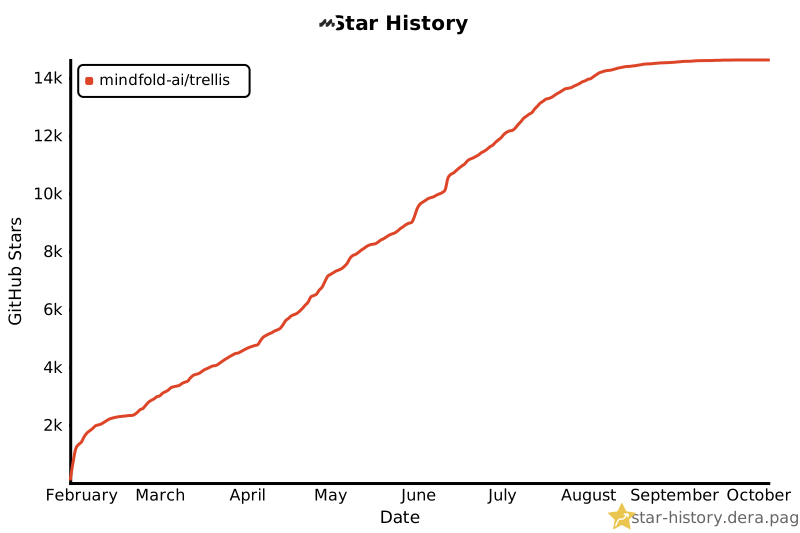](https://star-history.dera.page/#mindfold-ai/Trellis&Date) ## Community & Resources - [Official Docs](https://docs.trytrellis.app/) - [GitHub Issues](https://github.com/mindfold-ai/Trellis/issues) - [Discord](https://discord.com/invite/tWcCZ3aRHc) - [Tech Blog](https://docs.trytrellis.app/blog) <p align="center"> <a href="https://github.com/mindfold-ai/Trellis">Official Repository</a> • <a href="https://github.com/mindfold-ai/Trellis/blob/main/LICENSE">AGPL-3.0 License</a> • Built by <a href="https://github.com/mindfold-ai">Mindfold</a> </p>