discover · compare · collections · requirements · contribute · feed · watching · stats · help with your tokens
linyqh/NarratoAI · source
Snapshot 0 · 2026-11-04T12:47:27Z · Python · MIT
Content fingerprint
c980bd48b72704b74ee0559c342824a35914422bda0c128eba02e5106d81c0fdGitHub description at capture
利用 AI 大模型,一键解说并剪辑视频
README at capture
<div align="center"> <h1 align="center"> NarratoAI 😎📽️ </h1> <h3 align="center">一站式 AI 影视解说+自动化剪辑工具🎬🎞️ </h3> <p align="center"> 📖 <a href="README-en.md">English</a> | 简体中文 | <a href="https://narratoai.cn/">☁️ <b>云端版入口 (NarratoAI.cn)</b></a> </p> <br> NarratoAI 是一款自动化影视解说工具,基于 LLM 实现文案撰写、自动化视频剪辑、配音和字幕生成的一站式流程,助力高效内容创作。支持本地部署开源版及 [云端托管版](https://narratoai.cn/)。 <br> [](https://github.com/linyqh/NarratoAI/stargazers) [](https://github.com/linyqh/NarratoAI/issues) [](https://github.com/linyqh/NarratoAI) <br> <a href="https://github.com/linyqh/NarratoAI/wiki" target="_blank">💬 加入开源社群,获取项目动态和最新资讯</a> <br> <h2><a href="https://p9mf6rjv3c.feishu.cn/wiki/SP8swLLZki5WRWkhuFvc2CyInDg?from=from_copylink" target="_blank">🎉🎉🎉 官方文档 🎉🎉🎉</a> </h2> ### 界面预览  </div> ## 重磅福利 🎉 ### 火山引擎 感谢字节火山引擎赞助本项目! 火山方舟 Agent/Coding Plan 国模套餐首购 9.9,支持 GLM‑5.3、Kimi‑K3、DeepSeek、MiniMax、Doubao等,注册免费领2500w Token,统一 API,适配编码与智能体开发。--> [立即前往](https://www.volcengine.com/activity/ai618?utm_source=OWO&utm_medium=devrel-1&utm_campaign=hw&utm_term=NarratoAI&utm_content=hw) <a href="https://www.volcengine.com/activity/ai618?utm_source=OWO&utm_medium=devrel-1&utm_campaign=hw&utm_term=NarratoAI&utm_content=hw"> <img src="docs/volcengine.png" alt="火山引擎 Agent plan & Coding plan" style="width: 100%; max-width: 840px; height: auto;"> </a> > 即日起全面支持硅基流动!注册即享2000万免费Token(价值16元平台配额),剪辑10分钟视频仅需0.1元! > > 🔥 快速领福利: > 1️⃣ 点击链接注册:https://cloud.siliconflow.cn/i/MI9PgHwB > 2️⃣ 使用手机号登录,**务必填写邀请码:MI9PgHwB** > 3️⃣ 领取16元配额,极速体验高性价比AI剪辑 > > 💡 小成本大创作: > 硅基流动API Key一键接入,智能剪辑效率翻倍! > (注:邀请码为福利领取唯一凭证,注册后自动到账) > > 立即行动,用「MI9PgHwB」解锁你的AI生产力! ## ⚠️谨防被骗 📢 > 🔎 名称辨析:[**NarratoAI 与 NarratorAI 项目关系、开源范围与使用方式说明**](https://github.com/linyqh/NarratoAI/wiki/NarratoAI-%E4%B8%8E-NarratorAI-%E9%A1%B9%E7%9B%AE%E5%85%B3%E7%B3%BB%E5%92%8C%E5%8C%BA%E5%88%AB) _**1. NarratoAI 是一款完全免费的软件,近期在社交媒体(抖音,B站等)上发现,有人将 NarratoAI 改名后售卖,下面是部分截图,请大家务必提高警惕,切勿上当受骗**_ --- <div style="display: flex; flex-wrap: wrap; justify-content: space-around; align-items: flex-start; gap: 10px;"> <img src="https://github.com/user-attachments/assets/9cc0e5e4-bd5b-4655-b5ef-7d9085cdbc50" alt="诈骗截图 1" style="width: 23%; max-width: 250px; height: auto; border: 1px solid #ddd; border-radius: 5px; box-shadow: 2px 2px 8px rgba(0,0,0,0.1);"> <img src="https://github.com/user-attachments/assets/464b877c-b061-4856-8260-a0ef6fad7e52" alt="诈骗截图 2" style="width: 23%; max-width: 250px; height: auto; border: 1px solid #ddd; border-radius: 5px; box-shadow: 2px 2px 8px rgba(0,0,0,0.1);"> <img src="https://github.com/user-attachments/assets/9d7a6ea9-4bca-42b5-a61e-7e464037930f" alt="诈骗截图 3" style="width: 23%; max-width: 250px; height: auto; border: 1px solid #ddd; border-radius: 5px; box-shadow: 2px 2px 8px rgba(0,0,0,0.1);"> <img src="https://github.com/user-attachments/assets/09eeb94d-c670-4d7d-ba19-c0468bed3291" alt="诈骗截图 4" style="width: 23%; max-width: 250px; height: auto; border: 1px solid #ddd; border-radius: 5px; box-shadow: 2px 2px 8px rgba(0,0,0,0.1);"> </div> --- ## 最新资讯 - 2026.07.16 发布新版本 0.8.6,新增可选的 **Sonilo AI 配乐**,支持 Apple Silicon 的 **IndexTTS-1.5 MLX**,更新 IndexTTS-2 MLX API 适配,并补充 OmniVoice 部署包下载入口 - 2026.07.13 发布新版本 0.8.5,完善 `uv` + Python 3.12 本地运行流程,新增一键清理系统缓存和自定义 OpenAI 兼容 Base URL 的格式校验与 API Key 风险提示,并优化短脚本解析、字幕预览和音频设置的跨平台兼容性 - 2026.07.02 发布新版本 0.8.4,升级豆包语音 TTS 新版 API Key 配置并保留旧版凭据兼容 - 2026.06.10 发布新版本 0.8.1,**大版本更新**,优化多个核心流程 - 2026.04.27 发布新版本 0.7.9,新增 **Fun-ASR一键转录字幕** - 2026.04.03 发布新版本 0.7.8,重构纪录片逐帧分析链路,统一共享服务并优化抽帧、缓存、视觉并发与文案生成流程 - 2026.03.27 发布新版本 0.7.7,出于安全考虑,已移除 LiteLLM 依赖,统一使用 OpenAI 兼容请求链路 - 2025.11.20 发布新版本 0.7.5,新增 [IndexTTS-1.5](https://github.com/index-tts/index-tts) 语音克隆支持 - 2025.10.15 发布新版本 0.7.3,升级大模型供应商管理能力 - 2025.09.10 发布新版本 0.7.2,新增腾讯云tts - 2025.08.18 发布新版本 0.7.1,支持 **语音克隆** 和 最新大模型 - 2025.05.11 发布新版本 0.6.0,支持 **短剧解说** 和 优化剪辑流程 - 2025.03.06 发布新版本 0.5.2,支持 DeepSeek R1 和 DeepSeek V3 模型进行短剧混剪 - 2024.12.16 发布新版本 0.3.9,支持阿里 Qwen2-VL 模型理解视频;支持短剧混剪 - 2024.11.24 开通 discord 社群:https://discord.com/invite/V2pbAqqQNb - 2024.11.11 迁移开源社群,欢迎加入! [加入官方社群](https://github.com/linyqh/NarratoAI/wiki) - 2024.11.10 发布官方文档,详情参见 [官方文档](https://p9mf6rjv3c.feishu.cn/wiki/SP8swLLZki5WRWkhuFvc2CyInDg) - 2024.11.10 发布新版本 v0.3.5;优化视频剪辑流程, ### v0.8.6 更新亮点 | 功能 | 说明 | | --- | --- | | IndexTTS-1.5 macOS | 新增面向 Apple Silicon 的 MLX 本地语音克隆引擎,可上传或从资源目录选择参考音频。[下载部署包](https://cutagent.online/resources/indextts15-mlx-macos) | | IndexTTS-2 MLX | 更新 MLX Pack API 适配,支持参考音频、情感控制、随机种子和更完整的生成参数。[macOS 部署包](https://cutagent.online/resources/indextts2-full-macos)(Windows 版本待更新) | | OmniVoice | 补充 OmniVoice-Pack 部署包下载入口;该引擎支持自动音色、指令音色和参考音频克隆。[macOS 部署包](https://cutagent.online/resources/omnivoice-macos) / [Windows 部署包](https://cutagent.online/resources/omnivoice-windows) | ## 未来计划 🥳 - [x] windows 整合包发布 - [x] 优化剧情生成流程,提升生成效果 - [x] 发布 0.3.5 整合包 - [x] 支持阿里 Qwen2-VL 大模型理解视频 - [x] 支持 TwelveLabs Pegasus 作为可选的视频理解后端(原生理解整段画面以挑选高光、生成解说;可选启用,设置 `vision_llm_provider = "twelvelabs"`) - [x] 支持短剧混剪 - [x] 一键合并素材 - [x] 一键转录 - [x] 一键清理缓存 - [x] 支持导出剪映草稿 - [X] 支持短剧解说 - [ ] 主角人脸匹配 - [ ] 支持根据口播,文案,视频素材自动匹配 - [X] 支持更多 TTS 引擎 - [X] 支持可选的 AI 自动配乐 - [ ] ... ## 快速启动 🚀 ### 方式一:整合包(推荐) > 下载地址:[https://cutagent.online/](https://cutagent.online/) 请下载与系统对应的整合包并完整解压;不要单独移动其中的 `NarratoAI`、`runtime` 或 `tools` 等目录。Windows 使用 x64 版本;macOS 使用 Apple Silicon(M1/M2/M3/M4)arm64 版本。 #### Windows 1. 打开解压后的 `NarratoAI-windows-x64` 目录。 2. 先双击 `update-windows.bat` 更新项目,等待窗口提示更新完成。 3. 再双击 `start.bat` 启动应用,并保持启动窗口打开。 4. 在浏览器访问 `http://127.0.0.1:8501`。 #### macOS(Apple Silicon) 1. 打开解压后的 `NarratoAI-macos-arm64` 目录。 2. 若系统阻止打开脚本,请在“终端”中执行(将路径替换为实际解压位置): ```bash xattr -cr "/path/to/NarratoAI-macos-arm64" chmod +x "/path/to/NarratoAI-macos-arm64/"*.command ``` 3. 先双击 `update-macos.command` 更新项目,等待更新完成。 4. 再双击 `start-macos.command` 启动应用,并保持终端窗口打开。 5. 在浏览器访问 `http://127.0.0.1:8501`。 ### 方式二:macos Docker 部署(macos 推荐) ```bash # 1. 克隆项目 git clone https://github.com/linyqh/NarratoAI.git cd NarratoAI # 2. 一键部署 docker compose up -d # 3. 访问应用 # 浏览器打开 http://localhost:8501 ``` ### 方式三:本地运行 ```bash # 1. 克隆项目 git clone https://github.com/linyqh/NarratoAI.git cd NarratoAI # 2. 使用 uv 安装依赖 uv sync # 3. 复制配置文件 cp config.example.toml config.toml # 4. 编辑 config.toml,配置你的 API 密钥 # 5. 启动应用 uv run streamlit run webui.py --server.maxUploadSize=2048 # 6. 访问应用 # 浏览器打开 http://localhost:8501 ``` ## 配置要求 📦 - 建议最低 CPU 4核或以上,内存 8G 或以上,显卡非必须 - Windows 10/11 或 MacOS 11.0 以上系统 - [Python 3.12+](https://www.python.org/downloads/) ## 反馈建议 📢 👏 1. 可以提交 [issue](https://github.com/linyqh/NarratoAI/issues)或者 [pull request](https://github.com/linyqh/NarratoAI/pulls) 💬 2. [加入开源社区交流群](https://github.com/linyqh/NarratoAI/wiki) 📷 3. 关注公众号【NarratoAI助手】,掌握最新资讯 ## 参考项目 📚 - https://github.com/FujiwaraChoki/MoneyPrinter - https://github.com/harry0703/MoneyPrinterTurbo 该项目基于以上项目重构而来,增加了影视解说功能,感谢大佬的开源精神 🥳🥳🥳 ## 许可证 📝 点击查看 [`LICENSE`](LICENSE) 文件 ## Star History [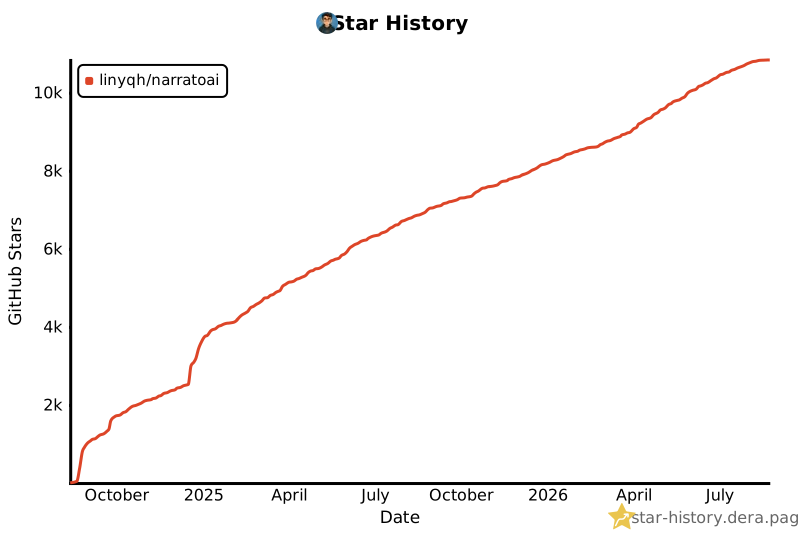](https://star-history.dera.page/#linyqh/NarratoAI&Date)