discover · compare · collections · requirements · contribute · feed · watching · stats · help with your tokens
game1024/OpenSpeedy · source
Snapshot 0 · 2026-11-04T12:47:27Z · TypeScript · GPL-3.0
Content fingerprint
9af21f5130bbd6ff640f230747e154f2723244bb41d9435d0f792319bd4591a9GitHub description at capture
🎮 An open-source game speed modifier.
README at capture
<h1 align="center"> OpenSpeedy </h1>
<p align="center">
<img style="margin:0 auto" width=100 height=100 src="https://github.com/user-attachments/assets/a82ceda2-9b7b-41e4-96dc-cd250c9bd3ff">
</img>
</p>
<p align="center">
The Best Open-Source Game Speed Controller
</p>
<p align="center">
<img src="https://api.visitorbadge.io/api/visitors?path=game1024.openspeedy&countColor=%234ecdc4">
<br/>
<a href="https://github.com/game1024/OpenSpeedy/stargazers">
<img src="https://img.shields.io/github/stars/game1024/OpenSpeedy?style=for-the-badge&color=yellow" alt="GitHub Stars">
</a>
<img src="https://img.shields.io/github/forks/game1024/OpenSpeedy?style=for-the-badge&color=8a2be2" alt="GitHub Forks">
<a href="https://github.com/game1024/OpenSpeedy/issues">
<img src="https://img.shields.io/github/issues-raw/game1024/OpenSpeedy?style=for-the-badge&label=Issues&color=orange" alt="Github Issues">
</a>
<br/>
<a href="https://github.com/game1024/OpenSpeedy/releases">
<img src="https://img.shields.io/github/downloads/game1024/OpenSpeedy/total?style=for-the-badge" alt="Downloads">
</a>
<a href="https://github.com/game1024/OpenSpeedy/releases">
<img src="https://img.shields.io/github/v/release/game1024/OpenSpeedy?style=for-the-badge&color=brightgreen" alt="Version">
</a>
<a href="https://github.com/game1024/OpenSpeedy/actions">
<img src="https://img.shields.io/github/actions/workflow/status/game1024/OpenSpeedy/build.yml?style=for-the-badge" alt="Github Action">
</a>
<a href="https://github.com/game1024/OpenSpeedy">
<img src="https://img.shields.io/badge/Platform-Windows-lightblue?style=for-the-badge" alt="Platform">
</a>
<br/>
<a href="https://github.com/game1024/OpenSpeedy/commits">
<img src="https://img.shields.io/github/commit-activity/m/game1024/OpenSpeedy?style=for-the-badge" alt="Commit Activity">
</a>
<img src="https://img.shields.io/badge/language-C/C++-blue?style=for-the-badge">
<img src="https://img.shields.io/badge/License-GPLv3-green.svg?style=for-the-badge">
<br/>
<p align="center">
<a href="https://www.star-history.com/game1024/openspeedy">
<picture>
<source media="(prefers-color-scheme: dark)" srcset="https://api.star-history.com/badge?repo=game1024/OpenSpeedy&theme=dark" />
<source media="(prefers-color-scheme: light)" srcset="https://api.star-history.com/badge?repo=game1024/OpenSpeedy" />
<img alt="Star History Rank" src="https://api.star-history.com/badge?repo=game1024/OpenSpeedy" />
</picture>
</a>
</p>
<p align="center">
<a href="https://trendshift.io/repositories/17801?utm_source=trendshift-badge&utm_medium=badge&utm_campaign=badge-trendshift-17801" target="_blank" rel="noopener noreferrer">
<img src="https://trendshift.io/api/badge/trendshift/repositories/17801/monthly?language=C%2B%2B" alt="game1024%2FOpenSpeedy | Trendshift" width="250" height="55"/>
</a>
<a href="https://www.producthunt.com/products/openspeedy?embed=true&utm_source=badge-featured&utm_medium=badge&utm_campaign=badge-openspeedy" target="_blank" rel="noopener noreferrer"><img alt="OpenSpeedy - The best game speed controller | Product Hunt" width="250" height="54" src="https://api.producthunt.com/widgets/embed-image/v1/featured.svg?post_id=1206701&theme=light&t=1785119166721">
</a>
<a href="https://hellogithub.com/repository/975f473c56ad4369a1c30ac9aa5819e0" target="_blank">
<img src="https://abroad.hellogithub.com/v1/widgets/recommend.svg?rid=975f473c56ad4369a1c30ac9aa5819e0&claim_uid=kmUCncHJr9SpNV7&theme=neutral" alt="Featured|HelloGitHub" style="width: 250px; height: 54px;" width="250" height="54" />
</a>
</p>
</p>
<p align="center">
🌐 <a href="https://github.com/game1024/OpenSpeedy/blob/master/README.en-US.md">English</a> |
<a href="https://github.com/game1024/OpenSpeedy/blob/master/README.de-DE.md">Deutsch</a> |
<a href="https://github.com/game1024/OpenSpeedy/blob/master/README.fr-FR.md">Français</a> |
<a href="https://github.com/game1024/OpenSpeedy/blob/master/README.ja-JP.md">日本語</a> |
<a href="https://github.com/game1024/OpenSpeedy/blob/master/README.ko-KR.md">한국어</a> |
<a href="https://github.com/game1024/OpenSpeedy/blob/master/README.pt-BR.md">Português (BR)</a>
<br/> |
<a href="https://github.com/game1024/OpenSpeedy/blob/master/README.ru-RU.md">Русский</a> |
<a href="https://github.com/game1024/OpenSpeedy/blob/master/README.es-ES.md">Español</a> |
<a href="https://github.com/game1024/OpenSpeedy/blob/master/README.nl-NL.md">Nederlands</a> |
<a href="https://github.com/game1024/OpenSpeedy/blob/master/README.hi-IN.md">हिन्दी</a> |
<a href="https://github.com/game1024/OpenSpeedy/blob/master/README.zh-TW.md">繁體中文</a> |
<a href="https://github.com/game1024/OpenSpeedy/blob/master/README.zh-CN.md">简体中文</a>
</p>
# 🚀 Features
- Quick speed adjustment
- Modern UI
- Supports both x86 and x64 platform processes
- No kernel intrusion — Ring-3 level hooking, does not tamper with the system kernel
# 💾 Installation
📦 **Method 1: Winget**
``` powershell
# Install command
# Specify the exact package ID and source to avoid Microsoft Store name conflicts.
winget install --id Game1024.OpenSpeedy --exact --source winget
# Open a new terminal and run openspeedy
openspeedy
```
📥 **Method 2: Manual Download**
Visit the [Releases page](https://github.com/game1024/OpenSpeedy/releases) to download the latest version.
🎮 **Method 3: Steam (Optional)**
Get it on the [Steam store](https://store.steampowered.com/app/5010920/OpenSpeedy). This is an optional way to install.
# 💻 System Requirements
- OS: Windows 10 or later
- Platform: x86 (32-bit) and x64 (64-bit)
# 📝 Usage
1. Launch OpenSpeedy
2. Run the target game you want to speed up
<img src="https://github.com/user-attachments/assets/648e721d-9c3a-4d82-954c-19b16355d084" width="50%">
3. Select the game process and adjust the speed multiplier in the OpenSpeedy interface
<img src="https://github.com/user-attachments/assets/9cd56353-1906-44c5-ba29-b5b4d2db2b80" width="50%"/>
4. Takes effect immediately — see the comparison below
<video src="https://github.com/user-attachments/assets/7c75e37d-bc7a-4639-89a0-a34a21676cba" width="70%"></video>
# 🔧 How It Works
Prerequisites:
- [Node.js](https://nodejs.org/) 18+
- [Rust](https://www.rust-lang.org/)
- [CMake](https://cmake.org/)
- [Visual Studio](https://visualstudio.microsoft.com/) (with C++ desktop development workload)
Build command:
``` powershell
npm run tauri dev
```
OpenSpeedy adjusts game speed by hooking the following Windows system time functions:
| Function | Library | Purpose |
|----------|---------|---------|
| Sleep | user32.dll | Thread sleep |
| SetTimer | user32.dll | Creates message-based timers |
| timeGetTime | winmm.dll | Retrieves system uptime in milliseconds |
| GetTickCount | kernel32.dll | Retrieves system uptime in milliseconds |
| GetTickCount64 | kernel32.dll | Retrieves system uptime in milliseconds (64-bit) |
| QueryPerformanceCounter | kernel32.dll | High-resolution performance counter |
| GetSystemTimeAsFileTime | kernel32.dll | Retrieves system time |
| GetSystemTimePreciseAsFileTime | kernel32.dll | Retrieves high-precision system time |
| SetWaitableTimer | kernel32.dll | Sets a waitable timer |
| SetWaitableTimerEx | kernel32.dll | Sets a waitable timer (extended) |
# ⚠️ Warnings
- This tool is for educational and research purposes only
- Some online games have anti-cheat systems — using this tool may result in account bans
- Excessive speed may cause game physics engine glitches or crashes
- Not recommended for use in competitive online games
- Open-source software without digital signatures may trigger false positives from antivirus software
<p align="center">
<a href="https://www.365tz96752.com/?r=RWQVZD">
<img src="https://github.com/user-attachments/assets/e50ac3de-a1a8-4185-b081-c9f22ea126fe" />
</a>
</p>
# 🔄 Feedback
If you encounter any issues, please reach out via:
- [FAQ](https://github.com/game1024/OpenSpeedy/wiki#faq) — Check the wiki first for common issues
- [GitHub Issues](https://github.com/game1024/OpenSpeedy/issues) — Submit bug reports. Please do not submit cloud storage related issues, thank you for your cooperation~ 🙏
# License
OpenSpeedy is licensed under the [GPL v3](LICENSE) license.
# 🙏 Acknowledgments
OpenSpeedy uses source code from the following projects. Thanks to the open-source community! If OpenSpeedy helps you, a Star is welcome!
- [minhook](https://github.com/TsudaKageyu/minhook): For API hooking
- [tauri](https://tauri.app/): GUI framework
- [MUI](https://mui.com/): UI component library
- [Ant Design](https://ant.design/): UI splitter component
Disclaimer: OpenSpeedy is intended for educational and research purposes only. Users assume all risks and liabilities associated with the use of this software. The author is not responsible for any loss or legal liability arising from the use of this software.
<a href="https://openomy.com/game1024/openspeedy" target="_blank" style="display: block; width: 100%;" align="center">
<img src="https://openomy.com/svg?repo=game1024/openspeedy&chart=bubble&latestMonth=6" target="_blank" alt="Contribution Leaderboard" style="display: block; width: 100%;" />
</a>
[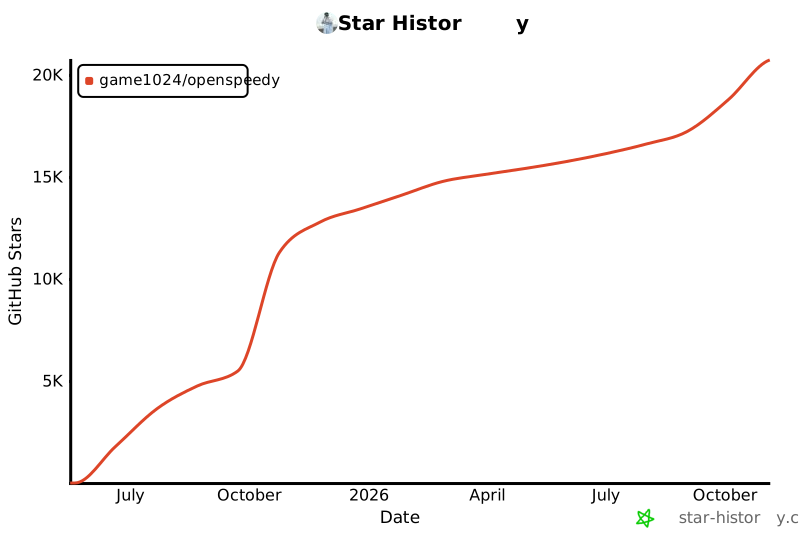](https://www.star-history.com/?repos=game1024%2Fopenspeedy&type=date&legend=top-left)