discover · compare · collections · requirements · contribute · feed · watching · stats · help with your tokens
alyssaxuu/flowy · source
Snapshot 0 · 2026-11-04T12:47:26Z · JavaScript · MIT
Content fingerprint
667303950bb914ae6ac55c031be251294fe03b8f74a93fac5be64fad0aedeb31GitHub description at capture
The minimal javascript library to create flowcharts ✨
README at capture
# Flowy
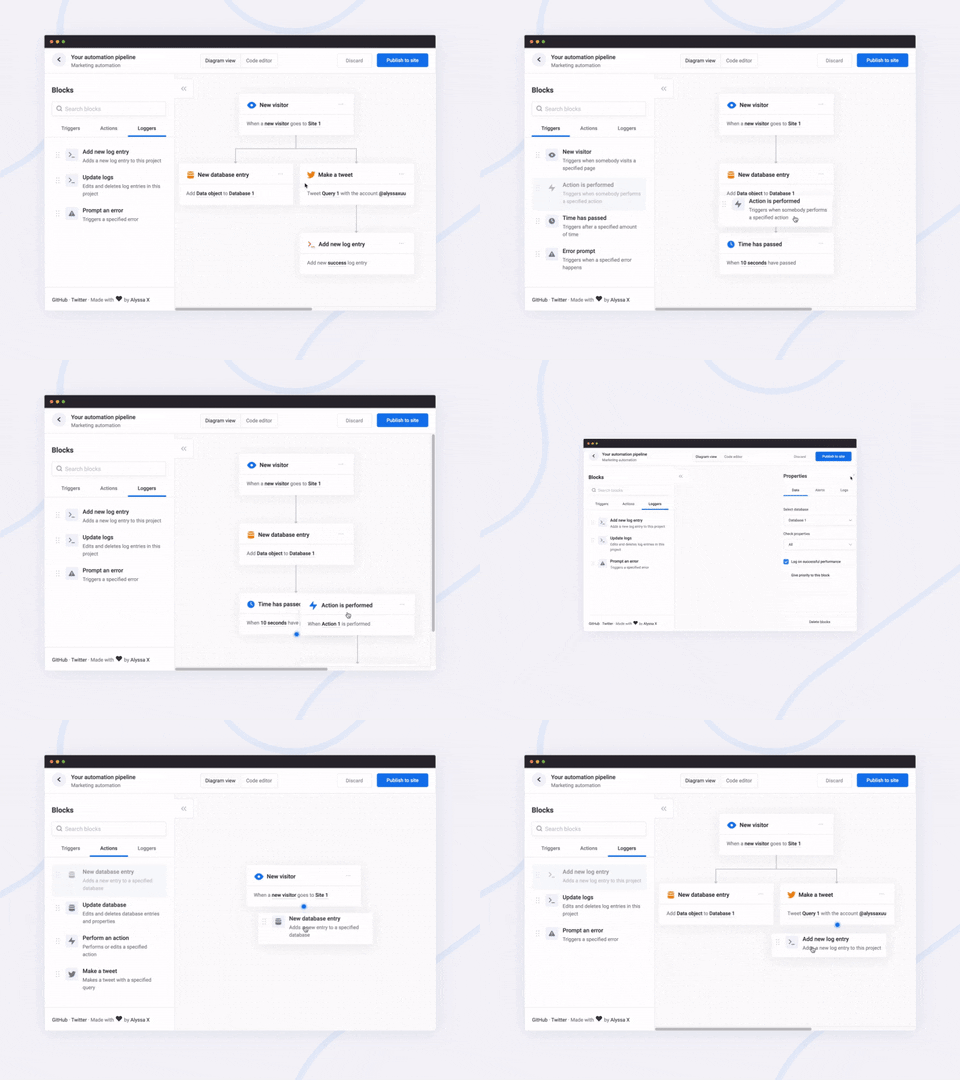
<br>A javascript library to create pretty flowcharts with ease ✨
[Dribbble](https://dribbble.com/shots/8576286-Flowy-Flowchart-Engine) | [Twitter](https://twitter.com/alyssaxuu/status/1199724989353730048) | [Live demo](https://alyssax.com/x/flowy)
Flowy makes creating WebApps with flowchart functionality an incredibly simple task. Build automation software, mind mapping tools, or simple programming platforms in minutes by implementing the library into your project.
> You can support this project (and many others) through [GitHub Sponsors](https://github.com/sponsors/alyssaxuu)! ❤️
Made by [Alyssa X](https://alyssax.com)
## Table of contents
- [Features](#features)
- [Installation](#installation)
- [Running Flowy](#running-flowy)
- [Initialization](#initialization)
- [Example](#example)
- [Callbacks](#callbacks)
- [On grab](#on-grab)
- [On release](#on-release)
- [On snap](#on-snap)
- [On rearrange](#on-rearrange)
- [Methods](#methods)
- [Get the flowchart data](#get-the-flowchart-data)
- [Import the flowchart data](#import-the-flowchart-data)
- [Delete all blocks](#delete-all-blocks)
## Features
Currently, Flowy supports the following:
- [x] Responsive drag and drop
- [x] Automatic snapping
- [x] Automatic scrolling
- [x] Block rearrangement
- [x] Delete blocks
- [x] Automatic block centering
- [x] Conditional snapping
- [x] Conditional block removal
- [x] Import saved files
- [x] Mobile support
- [x] Vanilla javascript (no dependencies)
- [ ] [npm install](https://github.com/alyssaxuu/flowy/issues/10)
You can suggest new features [here](https://github.com/alyssaxuu/flowy/issues)
## Installation
Adding Flowy to your WebApp is incredibly simple:
1. Link `flowy.min.js` and `flowy.min.css` to your project. Through jsDelivr:
```html
<link rel="stylesheet" href="https://cdn.jsdelivr.net/gh/alyssaxuu/flowy/flowy.min.css">
<script src="https://cdn.jsdelivr.net/gh/alyssaxuu/flowy/flowy.min.js"></script>
```
2. Create a canvas element that will contain the flowchart (for example, `<div id="canvas"></div>`)
3. Create the draggable blocks with the `.create-flowy` class (for example, `<div class="create-flowy">Grab me</div>`)
## Running Flowy
### Initialization
```javascript
flowy(canvas, ongrab, onrelease, onsnap, onrearrange, spacing_x, spacing_y);
```
Parameter | Type | Description
--- | --- | ---
`canvas` | *javascript DOM element* | The element that will contain the blocks
`ongrab` | *function* (optional) | Function that gets triggered when a block is dragged
`onrelease` | *function* (optional) | Function that gets triggered when a block is released
`onsnap` | *function* (optional) | Function that gets triggered when a block snaps with another one
`onrearrange` | *function* (optional) | Function that gets triggered when blocks are rearranged
`spacing_x` | *integer* (optional) | Horizontal spacing between blocks (default 20px)
`spacing_y` | *integer* (optional) | Vertical spacing between blocks (default 80px)
To define the blocks that can be dragged, you need to add the class `.create-flowy`
### Example
**HTML**
```html
<div class="create-flowy">The block to be dragged</div>
<div id="canvas"></div>
```
**Javascript**
```javascript
var spacing_x = 40;
var spacing_y = 100;
// Initialize Flowy
flowy(document.getElementById("canvas"), onGrab, onRelease, onSnap, onRearrange, spacing_x, spacing_y);
function onGrab(block){
// When the user grabs a block
}
function onRelease(){
// When the user releases a block
}
function onSnap(block, first, parent){
// When a block snaps with another one
}
function onRearrange(block, parent){
// When a block is rearranged
}
```
## Callbacks
In order to use callbacks, you need to add the functions when initializing Flowy, as explained before.
### On grab
```javascript
function onGrab(block){
// When the user grabs a block
}
```
Gets triggered when a user grabs a block with the class `create-flowy`
Parameter | Type | Description
--- | --- | ---
`block` | *javascript DOM element* | The block that has been grabbed
### On release
```javascript
function onRelease(){
// When the user lets go of a block
}
```
Gets triggered when a user lets go of a block, regardless of whether it attaches or even gets released in the canvas.
### On snap
```javascript
function onSnap(block, first, parent){
// When a block can attach to a parent
return true;
}
```
Gets triggered when a block can attach to another parent block. You can either prevent the attachment, or allow it by using `return true;`
Parameter | Type | Description
--- | --- | ---
`block` | *javascript DOM element* | The block that has been grabbed
`first` | *boolean* | If true, the block that has been dragged is the first one in the canvas
`parent` | *javascript DOM element* | The parent the block can attach to
### On rearrange
```javascript
function onRearrange(block, parent){
// When a block is rearranged
return true;
}
```
Gets triggered when blocks are rearranged and are dropped anywhere in the canvas, without a parent to attach to. You can either allow the blocks to be deleted, or prevent it and thus have them re-attach to their previous parent using `return true;`
Parameter | Type | Description
--- | --- | ---
`block` | *javascript DOM element* | The block that has been grabbed
`parent` | *javascript DOM element* | The parent the block can attach to
## Methods
### Get the flowchart data
```javascript
// As an object
flowy.output();
// As a JSON string
JSON.stringify(flowy.output());
```
The JSON object that gets outputted looks like this:
```json
{
"html": "",
"blockarr": [],
"blocks": [
{
"id": 1,
"parent": 0,
"data": [
{
"name": "blockid",
"value": "1"
}
],
"attr": [
{
"id": "block-id",
"class": "block-class"
}
]
}
]
}
```
Here's what each property means:
Key | Value type | Description
--- | --- | ---
`html` | *string* | Contains the canvas data
`blockarr` | *array* | Contains the block array generated by the library (for import purposes)
`blocks` | *array* | Contains the readable block array
`id` | *integer* | Unique value that identifies a block
`parent` | *integer* | The `id` of the parent a block is attached to (-1 means the block has no parent)
`data` | *array of objects* | An array of all the inputs within a certain block
`name` | *string* | The name attribute of the input
`value` | *string* | The value attribute of the input
`attr` | *array of objects* | Contains all the data attributes of a certain block
### Import the flowchart data
```javascript
flowy.import(output)
```
Allows you to import entire flowcharts initially exported using the previous method, `flowy.output()`
Parameter | Type | Description
--- | --- | ---
`output` | *javascript DOM element* | The data from `flowy.output()`
#### Warning
This method accepts raw HTML and does **not** sanitize it, therefore this method is vulnerable to [XSS](https://owasp.org/www-community/attacks/DOM_Based_XSS). The _only_ safe use for this method is when the input is **absolutely** trusted, if the input is _not_ to be trusted the use this method can introduce a vulnerability in your system.
### Delete all blocks
To remove all blocks at once use:
```javascript
flowy.deleteBlocks()
```
Currently there is no method to individually remove blocks. The only way to go about it is by splitting branches manually.
#
Feel free to reach out to me through email at hi@alyssax.com or [on Twitter](https://twitter.com/alyssaxuu) if you have any questions or feedback! Hope you find this useful 💜