discover · compare · collections · requirements · contribute · feed · watching · stats · help with your tokens
Evil0ctal/Douyin_TikTok_Download_API · source
Snapshot 0 · 2026-11-04T12:47:26Z · Python · Apache-2.0
Content fingerprint
984a85ee2a2a0398e546755e2a39b1c26e037d8b7d99fa424461b7d1ddfdfe42GitHub description at capture
🚀 自托管的抖音、TikTok、B 站数据采集与无水印视频下载 API,支持 AI agent 通过 MCP 调用与离线语音转文字,Docker 一键部署。| Self-hosted TikTok, Douyin & Bilibili scraper and no-watermark video downloader — async REST API, MCP server for AI agents, CLI and web console, plus offline speech-to-text for downloaded videos. Self-healing identity pool, PostgreSQL archive, one docker compose up.
README at capture
<div align="center">
<a href="https://douyin.wtf/" alt="logo"><img src="./logo/logo.svg" width="120" alt="Douyin_TikTok_Download_API"/></a>
</div>
<h1 align="center">Douyin_TikTok_Download_API</h1>
<div align="center">
[English](./README.md) | [简体中文](./README.zh-CN.md)
🚀 A self-hosted data API for [Douyin](https://www.douyin.com), [TikTok](https://www.tiktok.com) and [Bilibili](https://www.bilibili.com). One `docker compose up`, an identity pool that maintains itself, and a REST API, MCP server and web console on top.
Open source, free, and it runs on your own machine — no signup, no quota, nobody else in the path. It fetches posts, authors and comments, sounds, hashtags, live rooms, trending boards and search results, downloads video and image albums **without a watermark** (it picks the clean stream the platform already publishes rather than stripping anything), and keeps what it collects in your own PostgreSQL. A video it has downloaded can be turned into text on the same machine, offline, and an AI agent can drive all of it over MCP.
[](LICENSE)
[](https://github.com/Evil0ctal/Douyin_TikTok_Download_API/releases/latest)
[](https://github.com/Evil0ctal/Douyin_TikTok_Download_API/stargazers)
[](https://github.com/Evil0ctal/Douyin_TikTok_Download_API/forks)
[](https://github.com/Evil0ctal/Douyin_TikTok_Download_API/issues)
<br>
[](https://github.com/Evil0ctal/Douyin_TikTok_Download_API/actions/workflows/ci.yml)
[](https://github.com/Evil0ctal/Douyin_TikTok_Download_API/actions/workflows/codeql.yml)
[](https://github.com/Evil0ctal/Douyin_TikTok_Download_API/commits/main)
<br>
[](https://douyin.wtf)
[](https://demo.douyin.wtf)
[](./pyproject.toml)
[](./documents/en/12-mcp.md)
[](https://hub.docker.com/r/evil0ctal/douyin_tiktok_download_api)
[](https://hub.docker.com/r/evil0ctal/douyin_tiktok_download_api/tags)
</div>
## 💖 Sponsors
These sponsors paid to be here, and **Douyin_TikTok_Download_API** stays free and open because of it. To sponsor the project, see my [GitHub Sponsors page](https://github.com/sponsors/evil0ctal).
<div align="center">
<a href="https://www.tikhub.io/?utm_source=douyin_tiktok_download_api&utm_medium=referral&utm_campaign=sponsor&utm_content=readme_logo" target="_blank" rel="sponsored noopener">
<img src="https://tikhub.io/logo.jpeg" width="100" alt="TikHub.io - Global Social Data & API Marketplace">
</a>
<h2>
<a href="https://www.tikhub.io/?utm_source=douyin_tiktok_download_api&utm_medium=referral&utm_campaign=sponsor&utm_content=readme_name" target="_blank" rel="sponsored noopener"><b>TikHub.io</b></a>
</h2>
<p>Your Ultimate Social Media Data & API Marketplace</p>
<p>
Professional data solutions for Douyin, Xiaohongshu, TikTok, Instagram, YouTube,
Twitter, and more.<br>
Real-time Data | Flexible APIs | Seamless Integration | Competitive Pricing with Discounts
</p>
<p>
Buy and sell custom APIs, services, and social media solutions on the<br>
TikHub.io Marketplace, alongside developers, businesses and content creators.
</p>
<p><em>Trusted by leading global influencer marketing and social media intelligence platforms</em></p>
<p>
<a href="https://www.tikhub.io/?utm_source=douyin_tiktok_download_api&utm_medium=referral&utm_campaign=sponsor&utm_content=readme_cta" target="_blank" rel="sponsored noopener"><b>→ Visit TikHub.io</b></a>
·
<a href="https://api.tikhub.io/?utm_source=douyin_tiktok_download_api&utm_medium=referral&utm_campaign=sponsor&utm_content=readme_docs" target="_blank" rel="sponsored noopener">API docs</a>
</p>
</div>
## 🧩 REER — a forum for reverse engineering
<div align="center">
<a href="https://reer.dev" target="_blank" rel="noopener">
<img src="./logo/reer.png" width="88" alt="REER">
</a>
<h3><a href="https://reer.dev" target="_blank" rel="noopener"><b>reer.dev</b></a></h3>
</div>
Somewhere to put what you work out. This project exists because people wrote down
how a signature was built; the forum is for the next round of that — signatures,
protocols, packers, anything taken apart.
Free, no advertising, and close to no rules beyond the obvious. Bilingual, English
and Chinese. Register and post; nothing is gated.
## 🎬 What it looks like
<div align="center">
<img src="./screenshots/console-en.gif" width="900" alt="The DTK console: overview, identities, scheduler, playground, library, downloads, API docs and MCP"/>
</div>
One real call: paste a link, send it, get the normalised result back. The identity pool, the
scheduler and the API reference it passed through on the way are all in the same console.
The interface follows the browser's language, and both are written by hand rather than
machine-translated. [中文界面](./screenshots/console-zh.gif)
### Try it without installing anything
**<https://demo.douyin.wtf>** is a live instance, open to everyone. Sign in — the login page
fills the demo account in for you — and use the console: the playground, the scheduler,
the library, the API reference. The same account comes with an API key you can call the
scraping endpoints with, shown in plaintext on the API keys page.
It is read-only. Demo requests are not written to the request log or the archive, so the
database of a public instance cannot be filled by strangers, and switching demo mode off
ends every demo session and kills the key immediately.
**Rate limit: 30 requests per 10 seconds.** Go over it and you are cooled down for 10
seconds, during which every request is refused. It is a shared instance, and the identity
pool behind it is the ceiling for everybody using it at once.
What the demo is for is deciding whether to run your own. It is not a service to build
on — it can go down, be reset, or be switched off, and none of that will be announced.
## 🚀 v4 vs v5
v5 is a rewrite. It started from an empty branch and inherits no v4 code.
v4's real problem was never a shortage of features — it was that **the API would die
quietly and nobody would know**. A cookie expires, a signature algorithm changes, an
endpoint gets rate-limited, and you find out when someone files an issue. v5 puts
"you can see it" and "it heals itself" ahead of features.
| | v4 | v5 |
|---|---|---|
| Where identities come from | You copy cookies out of a browser into `config.yaml` | A headless browser mints guest identities, and the pool tops itself up when usable ones run low |
| How requests go out | Straight out, as they arrive | Health tiers, quantised LRU rotation, one in-flight lock per identity, a token bucket per (identity, endpoint), a circuit breaker per endpoint |
| When something breaks | You wait for a bug report | One structured record per request, live health for every identity and endpoint, visible in the console |
| Call style | Synchronous — send and wait | Asynchronous by default (`202` + `task_id`); add `?wait=` to go back to synchronous |
| What is kept | Nothing; parsed and discarded | PostgreSQL + Redis. Everything parsed is archived, so a post deleted upstream is still here |
| Access control | None; anyone can call it | API keys with scopes and roles, managed in the console |
| Interface | A single PyWebIO page | A React console: identity pool, scheduler, library, downloads, logs, diagnostics |
| Ways in | REST | REST, MCP and a CLI, all over the same service layer |
| Signing | X-Bogus, A_Bogus | a_bogus, X-Bogus, X-Gnarly, X-Dynosaur and Bilibili's WBI in pure Python, with a browser fallback |
| Deployment | `pip install -r requirements.txt` + `python start.py` | `docker compose up`, three images |
| Platforms | Douyin, TikTok, Bilibili | Douyin, TikTok, Bilibili |
Bilibili was the one thing that went backwards in 5.0, because it shares neither the
signing nor the identity machinery with Douyin and TikTok. It is back in 5.1.6, with
the two pieces of its own that needed writing: its WBI signature in pure Python, and
guest identities minted over plain HTTP, so a Bilibili pool needs no browser container.
### Still on v4?
v4's code stays on the [`v4` branch](https://github.com/Evil0ctal/Douyin_TikTok_Download_API/tree/v4),
the image is still published, and one command brings it up:
```bash
docker run -d --name dtk-v4 --restart unless-stopped \
-p 8080:80 evil0ctal/douyin_tiktok_download_api:V4.1.2
```
Then open <http://localhost:8080>; the API reference is at `/docs`. Port 8080 is
deliberate — v5 binds 8000, so the two versions can run side by side on one machine.
**Replace the Douyin cookie before you use it.** v4 has no identity pool, and the cookie
baked into the image expired long ago, so Douyin endpoints answer `400` until you put
your own in:
```bash
docker cp dtk-v4:/app/crawlers/douyin/web/config.yaml ./douyin-web.yaml
# replace the Cookie line with one from your browser, then save
docker rm -f dtk-v4
docker run -d --name dtk-v4 --restart unless-stopped -p 8080:80 \
-v "$PWD/douyin-web.yaml:/app/crawlers/douyin/web/config.yaml" \
evil0ctal/douyin_tiktok_download_api:V4.1.2
```
TikTok's two config files are at `/app/crawlers/tiktok/web/config.yaml` and
`/app/crawlers/tiktok/app/config.yaml`, and are mounted the same way.
To keep it under Compose instead, one file is enough — with `douyin-web.yaml` already
copied out next to it, or Docker will create a *directory* under that name and the app
will fail to read its config:
```yaml
# compose.yml
services:
app:
image: evil0ctal/douyin_tiktok_download_api:V4.1.2
container_name: dtk-v4
restart: unless-stopped
ports:
- "8080:80"
environment:
TZ: Asia/Shanghai
volumes:
- ./douyin-web.yaml:/app/crawlers/douyin/web/config.yaml
```
```bash
docker rm -f dtk-v4 # the container from the run above holds the name
docker compose -p dtk-v4 up -d
```
`main` is v5 now and `latest` is the newest v5 release — it moves when a release is cut, never
on a push to `main` — so **pin the tag to stay on v4**. `V4.1.2` is the last v4 release; the
branch merged a few PRs after it (Bilibili downloads, cookie hot-reload), and that code is
published under the commit tag `5be4838`.
There is no guided installer for v4 — the script in Quick start below installs v5. What
is above is all v4 gets: the branch still takes PRs, but nothing new is built on it, and
a fresh install should start on v5.
### Building this together
There are a few group chats around my open-source projects. If you want to work
on this one, or just talk shop, add me on WeChat at **`Evil0ctal`** with the note
**github 交流** and I will add you.
The groups are for learning from each other. **No advertising and nothing
illegal** — they are for making friends and talking about the work.
## 📦 What it can fetch
| Capability | Douyin | TikTok | Bilibili |
|---|:---:|:---:|:---:|
| One post (video or image album) | ✅ | ✅ | ✅ |
| Author profile | ✅ | ✅ | ✅ |
| An author's posts | ✅ | ✅ | ✅ |
| An author's liked posts | ✅ | ✅ | ❌ |
| Mixes / playlists / seasons, and an author's list of them | ✅ | ✅ | ✅ |
| Comments | ✅ | ✅ | ✅ |
| Comment replies | ✅ | ✅ | ✅ |
| Public folders and what is in them | ❌ | ✅ | ✅ |
| A video's parts, for one uploaded in several | — | — | ✅ |
| The site's popular boards: hot, weekly, all-time picks, top 100 | ❌ | ❌ | ✅ |
| Followers | ❌ | ✅ | ❌ |
| Following | ❌ | ✅ | ❌ |
| Posts recommended beside a post | ✅ | ✅ | ✅ |
| A sound, and the posts that use it | ✅ | ✅ | — |
| A hashtag | ✅ | ✅ | — |
| The posts under a hashtag | ❌ | ✅ | — |
| Keyword search: posts and accounts | ❌ | ✅ | ✅ |
| A live room: whether it is on, and its pull URLs | ✅ | ✅ | ✅ |
| A live room by its broadcast's own id, and Douyin app share links | ✅ | ✅ | — |
| Whether many live rooms are on air, in one call | ✅ | ✅ | ❌ |
| A live room's audience ranking | ✅ | ❌ | ❌ |
| Trending boards | ✅ | ❌ | ✅ |
Douyin serves its follower and following lists only to a signed-in session, so those
two endpoints are not registered at all: an endpoint that always returns an empty page
is worth nothing. Search and the posts under a hashtag are the same story: Douyin refuses
both to a guest, and no signed-in answer has been measured yet, so neither is offered there.
On TikTok the account search answers a guest, while the post search refuses one outright
(measured 2026-11-02), so an imported login is what it takes.
Importing your own logged-in cookies widens what the rest can see, too.
On Bilibili that matters most for comments: a guest is shown the three hottest and no
more, so an imported login is what turns that into the full thread. On Douyin it decides
an author's liked posts outright: a guest is shown none, public or not, so that list
needs a logged-in identity in the pool. An imported login is used at your own risk:
platforms rarely ban an account for reading data with it, but a ban cannot be ruled out
([what to know before importing one](documents/en/06-identities-and-proxies.md#a-logged-in-jar-is-not-a-guest-identity)).
The dashes are not gaps: a Douyin or TikTok post is never more than one video, so it has no
parts to list, and a Bilibili live room has one number for good rather than an id per
broadcast.
Media downloads, the content archive, counter snapshots, collections and a watchlist
are built in; none of them needs another service.
## 🤖 Let an AI agent use it: MCP
Point Claude Code, Claude Desktop, Codex CLI, Cherry Studio or any other MCP client at `/mcp` on
your own instance, and the agent can read posts, authors and comments, store a post's media and
transcribe it. It goes through the same service layer, identity pool and scheduler as the REST API,
and an API key's scopes bound what it may do.
```bash
claude mcp add --transport http dtk http://127.0.0.1:8000/mcp/ \
--header "Authorization: Bearer dtk_YOUR_API_KEY"
```
| Tool | What it does |
|---|---|
| `parse_url` | Fetch whatever a link points at — a post, an author, a short link, pasted share text |
| `get_video` · `get_user` | One post, or one author profile, by id |
| `list_user_posts` · `list_comments` | An author's posts or a post's comments, a page at a time |
| `get_content_history` | The recorded counter history of a post or an author, from the local database |
| `pool_status` | Identity-pool and endpoint health, so an agent can tell "try later" from "broken" |
| `download_media` | Store a post's media on this instance |
| `transcribe_video` | Turn a stored video into text |
| `get_task_result` | Collect a result that did not finish within the call |
Ten tools, and few on purpose: every extra tool makes an agent worse at picking the right one, so a
new capability arrives as an argument to an existing tool. Setup for each client, and what every
tool returns: [MCP and AI agents](./documents/en/12-mcp.md). The console shows the same guide at
`/mcp-guide`.
## 🎙 Speech to text, on your own machine
A downloaded video can be transcribed where it is stored. FunASR models — Paraformer for the
speech, FSMN-VAD to find where someone is talking, CT-Transformer for punctuation — run in a sidecar
on a network with no route out, so the audio never leaves the host and no API is called.
- **Where:** the **Transcriptions** page in the console, a **Transcribe video** button on every
finished download, the **Library** (one stored post, or a whole selection at once),
`POST /api/v1/transcriptions`, or the `transcribe_video` MCP tool
- **What you get:** one whole text per video, with numbers written as digits, exportable as `.txt`
- **How fast:** a 3 min 13 s clip took 3.7 seconds on two CPU cores; no GPU needed
- **What it is good at:** Mandarin. The models are the general Chinese ones, so other languages
come out poorly
It is off by default. The guided installer asks, then downloads the ~500 MB of models and checks
each file against its SHA-256; by hand, see [Preparing the FunASR ONNX models](./documents/en/18-funasr-models.md)
and [Turning a stored video into text](./documents/en/08-downloads-and-library.md#turning-a-stored-video-into-text).
## 🔗 Which links it accepts
Paste whatever you have — a short link, a post URL, or the whole caption a platform app
puts on your clipboard:
```
https://v.douyin.com/L4NpDJ6/
https://www.douyin.com/video/7126745726494821640
https://www.douyin.com/jingxuan?modal_id=7660875690212492466
https://www.tiktok.com/@evil0ctal/video/7156033831819037994
https://www.tiktok.com/t/ZTR9nkkmL/
2.84 nqe:/ <caption> https://v.douyin.com/L4FJNR3/ <sentence telling you to open the app>
https://www.bilibili.com/video/BV1xx411c7mD
https://www.bilibili.com/video/av170001
https://b23.tv/<code>
https://space.bilibili.com/2
```
Short links are followed and a link buried in a caption is extracted. A post id is also
checked against the platform's own encoding first, so an id that cannot exist is refused
here rather than costing an upstream request. A Bilibili av number is turned into the
bvid it stands for, so either spelling reaches the same post.
## ⚗️ Built with
| | |
|---|---|
| Service | Python 3.12 · FastAPI · SQLAlchemy 2.0 (async) · Alembic · Typer · structlog |
| Transport | wreq (browser TLS fingerprint emulation) · httpx |
| Data | PostgreSQL + TimescaleDB · Redis |
| Console | React 19 · TypeScript · Vite · TanStack Query · wouter · i18next |
| Signing | a_bogus, X-Bogus, X-Gnarly, X-Dynosaur and Bilibili's WBI in pure Python |
| Identity minting | CloakBrowser, headless, in a container of its own, called over HTTP; Bilibili guests over plain HTTP, no browser |
| Downloader | Go 1.23, standard library only, statically linked into a scratch image |
| Transcription | FunASR ONNX (Paraformer, FSMN-VAD, CT-Transformer), offline, in a container with no network route |
| Auth | argon2id password hashing · API keys with scopes |
| Protocols | REST (OpenAPI) · MCP (streamable-http) · CLI |
| Tooling | uv · ruff · mypy · pytest · Docker Compose |
Nothing beyond Postgres and Redis is required. No Kafka, no Elasticsearch, no object
store, no Kubernetes.
CloakBrowser is pinned to a specific commit. That pin is a security control — see
[docker/Dockerfile.browser](./docker/Dockerfile.browser).
## 🗂 Project layout
**First, what `dtk` is.** `Douyin_TikTok_Download_API` is a mouthful, so the code
says **DTK** instead: **D**ouyin + **T**i**K**Tok. The two platforms, and not the
download or API halves of the name.
It is the Python package (`src/dtk/`), the command (`dtk --help`), the prefix on
every environment variable (`DTK_SECRET_KEY` and friends), the Compose project
name (`-p dtk`), and the three letters in the console's title bar. Where you see
`dtk`, it means `Douyin_TikTok_Download_API`.
```
Douyin_TikTok_Download_API/
├── src/dtk/ the service; all of it lives here
│ ├── api/ FastAPI routes, auth, OpenAPI localisation
│ ├── platforms/ Douyin, TikTok and Bilibili adapters: endpoints, params, parsers
│ ├── signing/ a_bogus / X-Bogus / X-Gnarly / X-Dynosaur / WBI
│ ├── transport/ outbound requests, response classification
│ ├── identity/ identity minting and health
│ ├── scheduler/ identity selection, token buckets, circuit breakers
│ ├── services/ the business layer, shared by REST, MCP and the CLI
│ ├── worker/ async tasks, callbacks, scheduled collection
│ ├── db/ SQLAlchemy models and Alembic migrations
│ ├── ops/ diagnostics, backups, health checks, alerting
│ ├── media/ downloader client
│ ├── models/ one content model across every platform
│ ├── urls/ link recognition, short-link expansion, id validation
│ ├── mcp/ MCP server
│ ├── cli/ the dtk command line
│ ├── i18n/ server-side English and Chinese strings
│ └── core/ settings, logging, error types
├── web/ the React console, built into the app image
│ └── src/
│ ├── pages/ one file per console page
│ ├── components/ design system and shared components
│ └── locales/ console English and Chinese strings
├── docker/ four Dockerfiles, compose, and three sidecars
│ ├── browser_rpc/ Python, wrapping CloakBrowser
│ ├── downloader/ Go, the media download sidecar
│ ├── transcriber/ Python, offline FunASR transcription
│ └── compose.yml
├── documents/ user documentation, 18 pages in each language
├── tests/ unit / integration / contract / replay
├── scripts/ smoke.sh
├── .github/workflows/ CI and Docker image publishing
├── alembic.ini
├── pyproject.toml
└── Makefile
```
## ⚡️ Quick start: self-host it with Docker
If you would rather not think about it, the guided script asks a few questions and
brings the stack up — it works out your distribution, checks for Docker, and
scales the resource limits to the machine:
```bash
curl -fsSL https://raw.githubusercontent.com/Evil0ctal/Douyin_TikTok_Download_API/main/install/install.sh -o install.sh
less install.sh # reading it first is a good habit
bash install.sh
```
**Afterwards the same script is the operations tool.** Run it again and it finds the install and opens a menu: status, upgrade (compared against the latest GitHub release), passwords, an extra administrator, backup and restore, runtime settings, disk cleanup, stop or uninstall. `--manage` goes straight there.
Details in [install/README.md](./install/README.md). The manual route follows.
There are two ways to install this; below is the recommended one. For the by-hand route, see
[Without Docker](#without-docker).
| How | Who for | Full steps |
|---|---|---|
| **Docker Compose** (recommended) | Almost everyone, production included | [Installation · First install](./documents/en/02-installation.md#first-install) |
| By hand | Docker is not an option, or you are changing the code | [For development](./documents/en/02-installation.md#running-without-docker) · [On bare metal](./documents/en/02-installation.md#a-production-install-without-docker) |
> **Installing from mainland China?** Switch your mirrors before you start, or the pull will
> most likely time out:
> [Network preparation in mainland China](./documents/en/02-installation.md#network-preparation-in-mainland-china).
You need Docker and Docker Compose. Start by cloning the repository — the compose file,
the Dockerfiles and the migrations all live in it, and the default branch is v5:
```bash
git clone https://github.com/Evil0ctal/Douyin_TikTok_Download_API.git
cd Douyin_TikTok_Download_API
```
Nothing in the repository ships a default password or key, so write `.env` next:
```bash
POSTGRES_PASSWORD=$(openssl rand -hex 24)
REDIS_PASSWORD=$(openssl rand -hex 24)
cat > .env <<EOF
DTK_SECRET_KEY=$(openssl rand -base64 48)
POSTGRES_PASSWORD=${POSTGRES_PASSWORD}
REDIS_PASSWORD=${REDIS_PASSWORD}
DTK_DATABASE_URL=postgresql+asyncpg://dtk:${POSTGRES_PASSWORD}@postgres:5432/dtk
DTK_REDIS_URL=redis://:${REDIS_PASSWORD}@redis:6379/0
EOF
```
```bash
docker compose -p dtk -f docker/compose.yml up -d
docker compose -p dtk -f docker/compose.yml logs api # prints the setup token
```
Open <http://127.0.0.1:8000> and use the token from the log to create the first
administrator.
That starts no browser container, and without it (`--profile browser`, see
[the optional profiles](./documents/en/02-installation.md#the-optional-profiles)) Douyin and
TikTok identities can only be imported, not minted: both hand a visitor its cookies from inside
their page scripts. Bilibili guests are minted over plain HTTP either way.
### Where the image comes from
By default it is built locally: the first `up` compiles the application image from the
Dockerfile in this repository, which takes a few minutes. To skip that, point compose at
the published image instead, in the same `.env`:
```bash
cat >> .env <<'EOF'
DTK_IMAGE=evil0ctal/douyin_tiktok_download_api
DTK_IMAGE_TAG=latest
EOF
export COMPOSE_ENV_FILES=.env
docker compose -p dtk -f docker/compose.yml pull
docker compose -p dtk -f docker/compose.yml up -d
```
These two are read by compose itself rather than by the containers, and compose looks for
them in `docker/.env` unless `COMPOSE_ENV_FILES` says otherwise. Without the export it
finds nothing, falls back to the local names and quietly builds from source again, so it
belongs in every shell you run compose from. The script's `dtkctl` carries it for you.
`latest` is the newest release and moves only when one is cut, so updating later needs
nothing edited here. The `pull` is not optional: these services declare both `image` and
`build`, so compose builds from the local Dockerfile whenever the image is not already on
the machine rather than reaching for a registry.
Images are published for `linux/amd64` and `linux/arm64`, so Apple Silicon and a
Raspberry Pi both run natively. The browser container is not published: it installs
CloakBrowser from a pinned commit, and that pin is a security control that should be
yours to choose, so it stays a local build.
### Without Docker
Supported, and it is how the project itself is developed. You provide PostgreSQL 17 (**with the
TimescaleDB extension** — a plain `postgres:17` will not do), Redis 8, Python 3.12 and uv, plus
Node 22 if you build the console. Two sets of steps:
- [Running without Docker](./documents/en/02-installation.md#running-without-docker) — for
development; Postgres and Redis still come from containers
- [A production install without Docker](./documents/en/02-installation.md#a-production-install-without-docker)
— all of it by hand, systemd units included, verified on a clean Ubuntu 24.04
What the containers were doing for you — a non-root user, memory and CPU ceilings, a read-only root
filesystem, process supervision — you put back yourself. That section lists them one by one.
### Where to look next
| What you want to do | Where |
|---|---|
| Size a machine, change the container limits | [Three sizes](./documents/en/02-installation.md#three-sizes) · [Changing the limits](./documents/en/02-installation.md#changing-the-limits) |
| Turn on the browser container, the downloader or the transcriber sidecar | [The optional profiles](./documents/en/02-installation.md#the-optional-profiles) |
| Put TLS and a reverse proxy in front | [Behind a reverse proxy](./documents/en/02-installation.md#behind-a-reverse-proxy) |
| Understand how the environment is actually read | [Environment variables](./documents/en/02-installation.md#environment-variables) |
| Confirm an install is genuinely healthy | [Verifying an install](./documents/en/02-installation.md#verifying-an-install) |
| Read the compose file line by line | [docker/README.md](./docker/README.md) |
## 🖥 What you get: console, REST API, MCP and CLI
| Entry point | Where | What it is |
|---|---|---|
| Web console | `/` | Identity pool, scheduler, library, downloads, transcriptions, logs, diagnostics |
| API reference | `/docs` | Swagger UI inside the console, English and Chinese |
| Bare reference | `/swagger`, `/redoc` | No login required |
| REST API | `/api/v1/...` | 128 operations |
| MCP | `/mcp` | Shares the service layer with REST; client setup at `/mcp-guide` in the console |
| CLI | `dtk --help` | Same |
The main capabilities:
- **Parse** a link, share text, short link, or a bare post id
- **Archive** everything parsed, so a post deleted upstream is still here
- **Download** media to your own disk, in bulk by author, skipping what you have,
with duplicate cleanup
- **Transcribe** a stored video to text, offline
- **Watch** an author or a post and re-collect it on a timer
- **iOS Shortcut** support at `/api/v1/ios/shortcut`
## 🔄 Updating to a new release
The console keeps an eye out for you: `system.check_updates` is on by default,
and if a newer release exists you get one notice after signing in, at most once
a day. That request goes from **your browser** to GitHub — the server never
sends anything outward, so it does not tell anyone this instance exists. Turn it
off in Settings if you would rather it did not.
If you installed with the script, it is one command in the install directory:
```bash
cd /opt/dtk # or ~/dtk - wherever you installed it
./dtkctl upgrade # the latest release; ./dtkctl upgrade 5.1.6 for a given one
```
It moves the checkout to the release's tag, pulls the new images (or rebuilds them, on an
install built from source), rebuilds the browser image, takes a backup, migrates, and only
then writes the version it moved to into `.env` and restarts. Anything that fails before the
restart puts the checkout and `.env` back, and the old version keeps running. There is
nothing to edit by hand. An install from before
5.1.6 does not have `upgrade` yet; there, once, run `git pull && bash install/install.sh
--upgrade` in the same directory, and from then on it is `./dtkctl upgrade`. Running
`bash install.sh --manage` and picking 2 does the same from the menu.
By hand it is:
```bash
cd /opt/dtk && git pull
export COMPOSE_ENV_FILES=.env
# Running the published images (recommended). Name the services you run:
# add downloader and transcriber if you enabled them, with the same --profile flags.
docker compose -p dtk -f docker/compose.yml pull api worker
docker compose -p dtk -f docker/compose.yml build browser-rpc # only with --profile browser
docker compose -p dtk -f docker/compose.yml run --rm migrate
docker compose -p dtk -f docker/compose.yml up -d
```
With `DTK_IMAGE_TAG=latest` there is nothing to change first. A pinned version or
`sha-` build is the one thing a pin costs: move it in `.env` before you pull, which is
the step the script does for you. A checkout the script made sits on a release tag, where
`git pull` has no branch to pull: there, use
`git fetch origin tag v5.1.7 && git checkout --detach v5.1.7`.
Building locally instead? Swap `pull` for `build`.
`migrate` runs on every start and Alembic is idempotent, so running it separately is
only about getting the schema up before the containers switch over.
**Your data stays put.** The named volumes (`postgres-data`, `redis-data`,
`media-data`) survive a rebuild, so the identity pool, the archive, the settings
and the API keys are all where you left them.
The browser image is built from this checkout, never pulled, so rebuild it on every
update: under a tag that stays the same - `latest`, or a local build's `dev` - the old
one keeps running the old code. Cached layers keep it short.
To go back, `./dtkctl upgrade 5.1.5` with the script, or set `DTK_IMAGE_TAG` to the
previous version or `sha-` by hand and `up -d` again. Migrations have no automatic
downgrade, so the script refuses, before pulling anything, a release that lacks the
database's latest migration; past one, the way back is a new install of the old version
with a backup taken on it restored. Back the database up before upgrading — the script
does — which is the only rollback that always works.
## 📖 Documentation
**Read it online at [douyin.wtf](https://douyin.wtf)** — the same 18 pages, rendered,
searchable and in both languages. The markdown source is in
[`documents/`](./documents/README.md) and is what the site is built from, so the two
never disagree.
**New here:**
[Quick start](./documents/en/01-quickstart.md) ·
[Concepts](./documents/en/04-concepts.md) ·
[Console overview](./documents/en/05-console-overview.md)
**Running it:**
[Installation and deployment](./documents/en/02-installation.md) ·
[Configuration reference](./documents/en/03-configuration.md) ·
[Operations](./documents/en/10-operations.md) ·
[Troubleshooting](./documents/en/14-troubleshooting.md) ·
[Security](./documents/en/15-security.md)
**Building against it:**
[REST API guide](./documents/en/11-api.md) ·
[MCP and AI agents](./documents/en/12-mcp.md) ·
[CLI reference](./documents/en/13-cli.md) ·
[Contributing](./documents/en/16-contributing.md)
The endpoint reference is not in there: it is generated from the code that serves the
requests, so your own instance is the copy that is never out of date. Find it at `/docs`
inside the console, or at `/swagger`, `/redoc` and `/openapi.json` without a login. Both
languages.
中文文档:[`documents/README.zh-CN.md`](./documents/README.zh-CN.md)
**Reading this with an LLM?** [`llms.txt`](./llms.txt) is the whole documentation set
as one annotated index, in the [llmstxt.org](https://llmstxt.org) format.
## 📮 Contact
| | |
|---|---|
| Issues | [GitHub Issues](https://github.com/Evil0ctal/Douyin_TikTok_Download_API/issues) — public, keeps its history, and anyone who has hit the same thing can answer |
| Email | `Evil0ctal1985@gmail.com` — reaches one person; best for anything that does not belong in public |
| Author | [@Evil0ctal](https://github.com/Evil0ctal) |
Before asking, read [Troubleshooting](./documents/en/14-troubleshooting.md) and include
the output of the Diagnose page or `dtk diagnose`. It answers most of what a maintainer
would otherwise have to ask you.
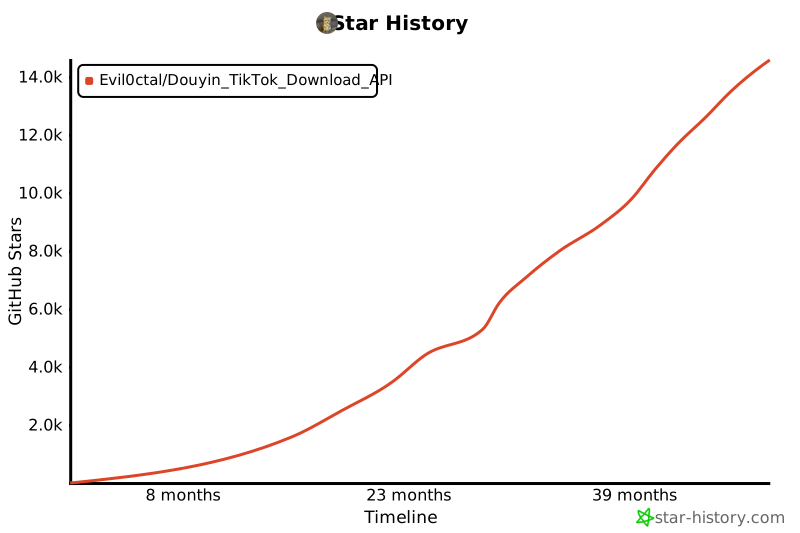
## ⭐️ Star history
[](https://star-history.com/#Evil0ctal/Douyin_TikTok_Download_API&Timeline)
> Started 2021/11/06 · GitHub [@Evil0ctal](https://github.com/Evil0ctal)
## 📄 Licence
[Apache License 2.0](./LICENSE).
You may use, modify and distribute this project, **including commercially and inside
closed-source products**. The grant is irrevocable. In return the licence asks you to:
- Keep the licence text and the [NOTICE](./NOTICE) file, which carries the copyright
notice, with any copy you distribute
- State what you changed, in files you modified
- Accept that it comes with no warranty
### A request from the author
This project is given away, and it stays free because sponsors pay for it rather than
users. **If you are making money from it, please consider sponsoring instead of only
taking.**
This is a request, not a licence condition — Apache 2.0 permits commercial use, and
nothing above takes that back.
## ☕️ Support the author
The sponsors above pay for the **project**. This section is for the **person who
maintains it**, and is entirely optional.
| Network | Address |
|---|---|
| Solana | `HvtkxmDERbNXfCoojpdFAYN5mSWowjpXgedsG9eF7y9z` |
| Tron (TRC20) | `TQwSM2vjcnrdRU7gY7KNp2tCgMnK33azkT` |
| Ethereum (ERC20) | `0x2f210FdfD981B59eC130370E5b1Aa8A6a06fb5Ad` |
| BNB Smart Chain (BEP20) | `0x2f210FdfD981B59eC130370E5b1Aa8A6a06fb5Ad` |
| Bitcoin | `bc1q785j55cxlnjqe8lkwy8cq57t8t9vn3ak9tlsfy` |
These networks carry the usual major tokens. **USDT on Tron (TRC20) or Solana** is the
easiest to receive, and the cheapest to send.
> **Send only on the network an address is listed under.** A transfer on the wrong chain
> cannot be recovered by anybody.
> Ethereum and BNB Smart Chain share one address on purpose: both are EVM chains, and
> the same key controls it.
[GitHub Sponsors](https://github.com/sponsors/evil0ctal) works too.
### What you are responsible for
This fetches data from platforms that have their own terms, and it runs on your machine
under your control. Respect those terms and applicable law, respect the people whose
content you collect, do not use it to harass anyone, and do not redistribute work that
is not yours. Nobody else can enforce any of that for you.